Key Findings
- A content search can run document macros. UltraFinder 2024.0.0.14 extracts text from .doc and .xls files by driving Microsoft Word and Excel through COM automation. Howler Cell confirmed in the lab that AutoOpen and Document_Open VBA macros in a Word document run silently the moment a folder containing the document is searched. The .xls path uses the same helper and is expected to behave the same way.
- No prompt on this path, and Mark-of-the-Web is not expected to help. Macros run under the account that started the search. Microsoft's internet-macro block is designed around documents a person opens, so it is not expected to apply to documents opened programmatically.
- The attack precondition drops from user execution to file presence. Any channel that lands a .doc on disk, including USB media, network shares, cloud sync, archive extraction, and email auto-save, can lead to macro execution once a content search is run over that location.
- Forensic and eDiscovery workflows are the most plausible exposure. These users routinely run keyword searches across untrusted evidence, disk images, and seized collections, so a macro-bearing document is more likely to be present in that data than in everyday business folders.
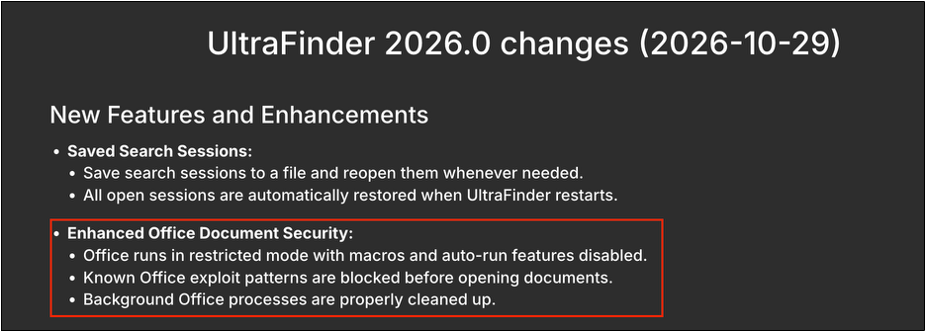
- IDM Computer Solutions shipped hardening in UltraFinder 2026.0 (October 29, 2026). The release notes state Office now runs in a restricted mode with macros and auto-run features disabled. Upgrade, and treat content searches of untrusted data on earlier builds as a macro execution risk.
Overview
The Howler Cell Threat Research Team at Cyderes identified an unsafe-by-default use of the Microsoft Office automation interface in IDM Computer Solutions' UltraFinder, a commercial desktop search and indexing tool sold as part of the UltraEdit suite. UltraFinder's bundled helper, DocExtractor.exe, uses Word and Excel as text parsers. It instantiates a hidden, out-of-process Office application for every supported legacy document and opens the file without first restricting macro execution.
The consequence is that a passive operation, clicking Search, runs VBA macros from supported legacy Office documents in the searched location. The user does not need to open or even see the file. We reproduced this with a benign .doc carrying an AutoOpen macro under default Office Trust Center settings; the macro ran during the search and wrote a marker file to disk under the searching user's account.
This is not a vulnerability in Microsoft Word. Office automation behaves as documented, and Microsoft places responsibility for macro policy on the calling application through the Application.AutomationSecurity property. The issue sits in the automation host, DocExtractor.exe, and is classified under CWE-829: Inclusion of Functionality from Untrusted Control Sphere.
| Vulnerability | Silent VBA macro execution via Office COM automation during content search |
|---|---|
| Affected product | IDM Computer Solutions (UltraEdit, Inc.) UltraFinder 2024.0.0.14 with DocExtractor.exe 1.0.0.1 |
| Vendor fix | UltraFinder 2026.0, released 2026-10-29, per the vendor release notes (vendor acknowledged the issue and confirmed a fix on 2026-06-04) |
| Weakness | CWE-829: Inclusion of Functionality from Untrusted Control Sphere |
| Impact | VBA macro execution in the context of the user running the search |
| User interaction | Running a content search over a location that contains the document |
| Severity | 8.5 High (CVSS 4.0, Howler Cell assessment)AV:L/AC:L/AT:N/PR:N/UI:P/VC:H/VI:H/VA:H/SC:N/SI:N/SA:N |
| CVE | Requested 2026-06-14; none assigned as of publication |
| Discovered by | Reegun Jayapaul, Howler Cell, Cyderes |
Technical Analysis
Affected Binaries
Analysis was performed against UltraFinder 2024.0.0.14 and its text-extraction helper. Both binaries are Authenticode-signed by UltraEdit, Inc. through DigiCert. The version resource of DocExtractor.exe identifies it as UltraFinder Document Text Extractor, FileVersion 1.0.0.1, and the embedded build path E:\Repos\UltraFinder.default\vs2017\x64\Release\DocExtractor.pdb confirms it is the legitimate vendor-shipped helper rather than a tampered copy.
| UltraFinder.exe2024.0.0.14 | MD5: cc80dd3055cd27e71b54fc4db423d561SHA-1: e3d7f94cf18fd5014b1995888653a5937f3b940eSHA-256: 87588f745c6f90cd657414e39c4dbad0e65906dc1f6cf7af9810f5f90e73f85e |
|---|---|
| DocExtractor.exe1.0.0.1 | MD5: df7e71f20b585411a361c6c37715cafbSHA-1: 01f77fc9c191a52a347e3c6ba513d8fbe9e97404SHA-256: 71afa3dd4f671b0c68f8d66ee76e2af9f86fa52c3a9b3597e74057799eec74aa |
How UltraFinder Searches Inside
Office Documents
UltraFinder does not parse legacy Office formats itself. When a content search reaches a supported Office file, it hands the work to a helper process and reads back plain text. The full flow we observed is:
-
The user starts a content search, looking for text inside files, including Word documents.
-
UltraFinder enumerates the target location, finds supported Office files (.doc, .docx and others) and decides text extraction is needed.
-
UltraFinder.exe spawns DocExtractor.exe via CreateProcess with the command line shown below.
-
DocExtractor.exe parses its arguments and uses OLE/COM automation to create Word.Application (or Excel.Application for .xls).
-
The helper opens the document, the equivalent of Documents.Open in VBA/COM, extracts its text, writes it to the /o temp file, cleans up and exits.
-
UltraFinder reads the temporary .txt and runs the actual search against the extracted content.
"C:\Program Files\IDM Computer Solutions\UltraFinder\DocExtractor.exe"
/d "<full path to directory>"
/o "<output>.txt" (written under %TEMP%)
/m "<generated numeric ID, e.g. 2879324167>"
Step 5 is where the trust boundary breaks. The document is attacker-controlled input, and it is being loaded into a full Office application whose macro engine is live.
The Primitive: Macros Run on Open
When UltraFinder searches a folder containing a macro-bearing .doc, DocExtractor.exe instantiates Word. Application and opens the file through COM. Lab reproduction confirmed three things:
-
AutoOpen and Document_Open VBA macros execute automatically during the search, with no security prompt or message bar.
-
Macros run under the user account that started the search.
-
No interaction is required beyond clicking Search. The user never opens, previews, or selects the malicious file.
Because Word is launched hidden and out of process, there is nothing on screen to tip the user off. From the user's point of view, a search ran and returned results. The reproduction used a Word document, and the .xls path is expected to behave the same way.
AutomationSecurity: The Control That Governs Macros in Automated Opens
Microsoft's Office object model gives the automation host explicit control over macro behavior for programmatically opened files through Application.AutomationSecurity. Microsoft documents that the default value is msoAutomationSecurityLow, so an automation host that does not set the property gets the most permissive behavior.
|
Value |
Constant |
Effect |
|
1 |
msoAutomationSecurityLow |
Macros run without prompting (default at application start) |
|
2 |
msoAutomationSecurityByUI |
Uses the user's Trust Center setting |
|
3 |
msoAutomationSecurityForceDisable |
All macros in programmatically opened files are disabled, without alerts |
A safe automation host sets this property to 3 before calling Documents. Open, which suppresses macros regardless of the user's Trust Center configuration. Microsoft's documentation example sets the property to disable macros before opening a file programmatically and restores the original value afterward. DocExtractor.exe does not produce this outcome: macros run.
Static Analysis Caveat
We are deliberate about the line between what we observed and what we inferred. Static analysis of DocExtractor.exe found no reference to AutomationSecurity or to other hardening property names a safe automation host would typically configure. That absence is consistent with the observed behavior, but it is one possible explanation, not the only one, and we have not isolated the exact code path that leaves Word macro-permissive. The vendor was best placed to identify the specific defect during triage.
Mark-of-the-Web Macro Block and the Automation Path
Since 2022, many organizations have relied on Microsoft's default block of VBA macros in files carrying the Mark-of-the-Web. That control is designed around a human opening a downloaded file through Explorer, Outlook, or a browser. It is not designed around the COM automation path, so a macro-bearing document that arrives from the internet and would be blocked if double-clicked would be expected to run when UltraFinder searches the folder that contains it.
Impact: From User Execution to File Presence
Standard malicious-document tradecraft, MITRE ATT&CK T1204.002, depends on persuading a user to open a file. This issue removes the user-opening step. Any macro-bearing .doc reachable by an UltraFinder content search runs its macros when the search is performed. An attacker still needs a way to land a file somewhere the victim will search.
The following channels could place a file where a content search would reach it:
- Removable media handed to, or found by, an analyst.
- Network shares and collaboration drives where any contributor can drop a file.
- Cloud sync clients that silently replicate shared folders to the endpoint.
- Archive extraction into a working directory that is then searched.
- Email auto-save of attachments into a local folder.
Forensic investigators and eDiscovery teams keyword-search large document collections and mounted disk images, which can contain untrusted content, often on analyst workstations that hold case data.
Attribution: Responsibility Sits With the Calling Application
- The AutomationSecurity property has been part of the published Office API for more than two decades.
- Office automation works as documented, including its permissive default.
- Microsoft expects the automation host to configure macro policy for each session it creates.
Responsibility lies with the calling application, in this case DocExtractor.exe, shipped by IDM Computer Solutions.
Vendor Response: UltraFinder 2026.0
IDM Computer Solutions released UltraFinder 2026.0 on October 29, 2026. Its release notes add an Enhanced Office Document Security item stating that Office now runs in a restricted mode with macros and auto-run features disabled, that known Office exploit patterns are blocked before documents are opened, and that background Office processes are cleaned up properly. The notes describe the change in general terms and do not reference this report.
Figure 1: UltraFinder 2026.0 release notes (2026-10-29), Enhanced Office Document Security highlighted
Disclosure Timeline
|
Date |
Event |
|
2026-04-26 |
Howler Cell begins investigation of UltraFinder 2024.0.0.14 |
|
2026-05-08 |
Report and proof-of-concept video provided to IDM Computer Solutions |
|
2026-05-16 |
Howler Cell follows up with the vendor |
|
2026-06-04 |
Vendor acknowledges the issue and confirms a fix |
|
2026-06-14 |
Howler Cell requests a CVE identifier; no further vendor updates received through public disclosure |
|
2026-10-29 |
UltraFinder 2026.0 released with Enhanced Office Document Security |
|
2026-11-02 |
Public disclosure by Howler Cell |
MITRE ATT&CK Mapping
|
Tactic |
Technique |
ID |
|
Lateral Movement |
Taint Shared Content |
T1080 |
|
Execution |
Inter-Process Communication: Component Object Model |
T1559.001 |
|
Execution |
Command and Scripting Interpreter: Visual Basic |
T1059.005 |
Mitigation
-
Upgrade to UltraFinder 2026.0 or later on every endpoint, and confirm each install reports that version.
-
Until upgraded, do not run content searches over untrusted locations (evidence, disk images, removable media, shared drop folders), or remove .doc/.xls from content-search file types.
-
Enable the Attack Surface Reduction rule Block all Office applications from creating child processes, which limits macro payloads that launch other processes. It does not restrict actions inside the Office process itself, such as file writes.
-
Enforce automation security centrally through the Office Group Policy Automation Security setting where available, to set macro behavior for programmatically opened files across automation hosts. Test in a pilot group before broad rollout.
-
Isolate forensic and eDiscovery search workloads on dedicated analysis systems without Microsoft Office installed, or with VBA disabled, so a content search never hands evidence to a live macro engine.
-
Audit other in-house and third-party tools that drive Office through COM for the same missing AutomationSecurity control. Any product that automates Office can have the same gap.
Howler Cell Perspective
Howler Cell assessment: A routine action that triggers macro execution deserves attention even when the attacker needs a file on disk. Searching is a passive action, and defenders have spent years training users not to open untrusted documents. On this path, the user never opens the document. Any application that uses Office as a parser inherits Office's macro engine, and unless it explicitly turns that engine off, it inherits the risk too.
The same pattern may exist elsewhere. Indexers, document converters, DLP agents, archive previewers, and eDiscovery platforms can automate Word and Excel to extract text, and the permissive AutomationSecurity default means each one must opt in to safety. The fix is a single property assignment. Omitting it allows macro execution on workstations that process untrusted documents.
References
Stay informed with Howler Cell
Receive the latest Howler Cell news and research directly to your inbox.
